


Last year, a client asked me to audit their marketing stack. They were paying $200/month for an email analytics add-on — a separate tool just to track open rates and click-throughs. The thing is, their email platform (Mailchimp free) already tracked everything they needed. They just didn’t know where to find it. That’s $2,400 per year wasted on data they already had. Email marketing analytics doesn’t have to cost anything — you just need to know what to track and where to look.
Whether you’re sending newsletters, promotional campaigns, or automated sequences, the metrics that matter are the same. Furthermore, every major free email platform includes analytics that cover 90% of what businesses need. Let me show you exactly what to track, which tools do it for free, and how to connect email data to your broader analytics setup.
6 Email Marketing Metrics That Actually Matter
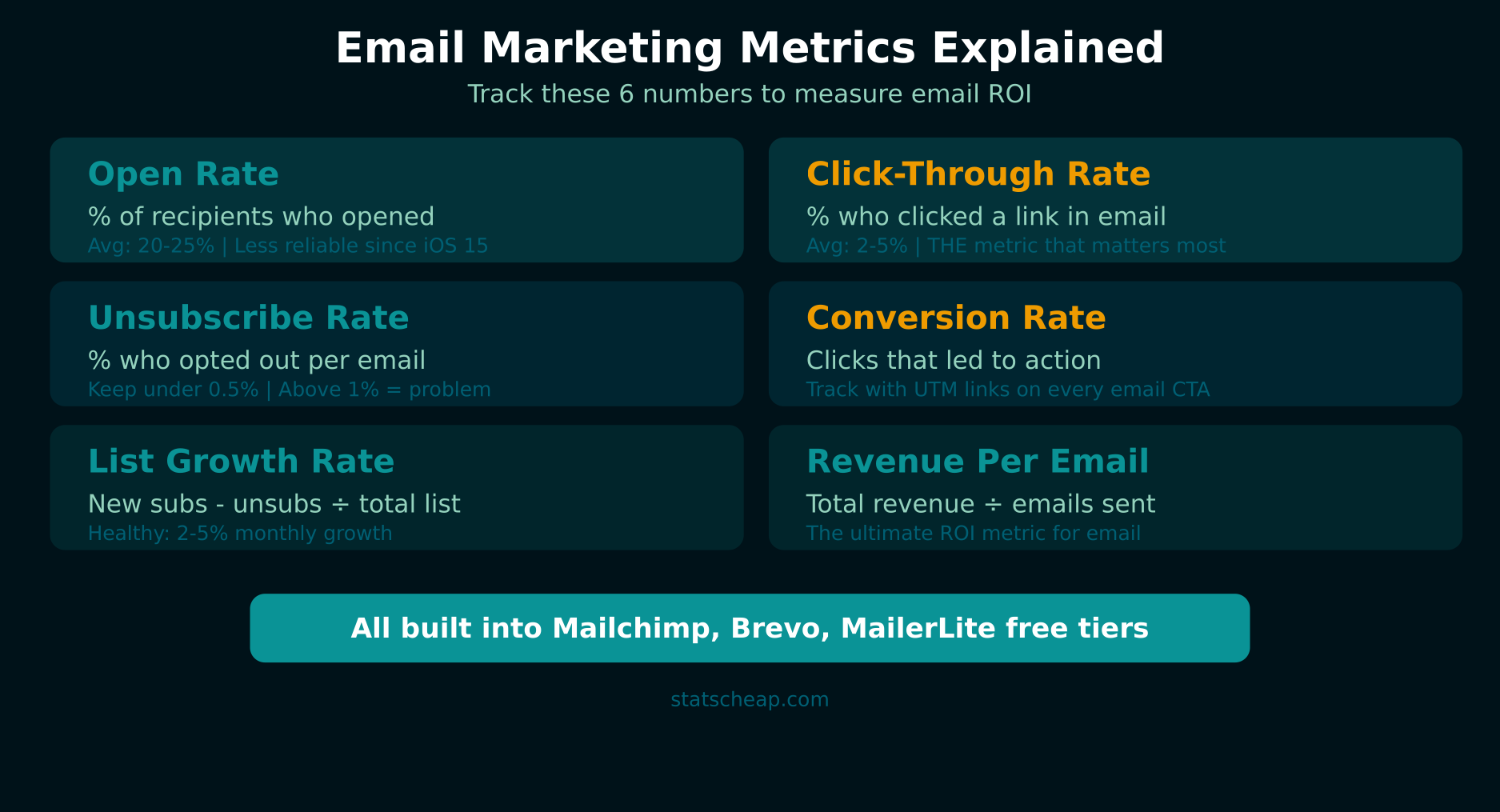
Most email dashboards throw 20+ metrics at you. Ignore most of them. These six metrics tell you everything you need to know about your email performance:
1. Open Rate (and Why It’s Less Reliable Than You Think)
Open rate measures how many recipients opened your email. It’s the most commonly tracked metric, but since Apple’s iOS 15 Mail Privacy Protection launched, it’s become less accurate. Apple’s system pre-loads email tracking pixels, artificially inflating open rates for Apple Mail users (which represent 50%+ of many audiences). Therefore, treat open rates as a trend indicator, not a precise measurement. If your open rate drops from 30% to 15% over three months, that’s meaningful. The exact number on any single email? Take it with a grain of salt.
2. Click-Through Rate (THE Metric)
This is the metric that matters most. Click-through rate (CTR) measures how many recipients clicked a link in your email. Unlike open rates, CTR isn’t affected by Apple’s privacy changes — it requires an actual human action. A good CTR varies by industry (1-5% is typical), but the trend matters more than the benchmark. Furthermore, CTR directly connects your email efforts to website traffic, which connects to conversions and revenue.
3. Unsubscribe Rate
A healthy unsubscribe rate is under 0.5% per email. If it spikes above 1%, something’s wrong — you’re emailing too frequently, your content isn’t relevant, or your list includes unengaged subscribers. However, some unsubscribes are healthy. A smaller, engaged list outperforms a large, disengaged one every time.
4. Conversion Rate
The percentage of email recipients who completed a desired action — purchased a product, signed up for a webinar, downloaded a guide. This requires connecting your email platform to your website analytics with UTM parameters. Without UTM tracking, you know someone clicked, but you don’t know if they converted. With it, you can attribute revenue directly to specific emails.
5. List Growth Rate
New subscribers minus unsubscribes, divided by total list size. A positive growth rate means your audience is expanding. If growth is flat or negative, your lead generation needs attention. Aim for 2-5% monthly growth for a healthy list.
6. Revenue Per Email
Total revenue attributed to an email divided by the number of delivered emails. This is the ultimate metric for e-commerce and product businesses. If you know that each newsletter generates $0.15 per recipient, you can calculate the exact value of growing your list. For example, adding 1,000 subscribers would be worth $150 per send — that’s real ROI math.
Free Email Marketing Tools with Built-In Analytics
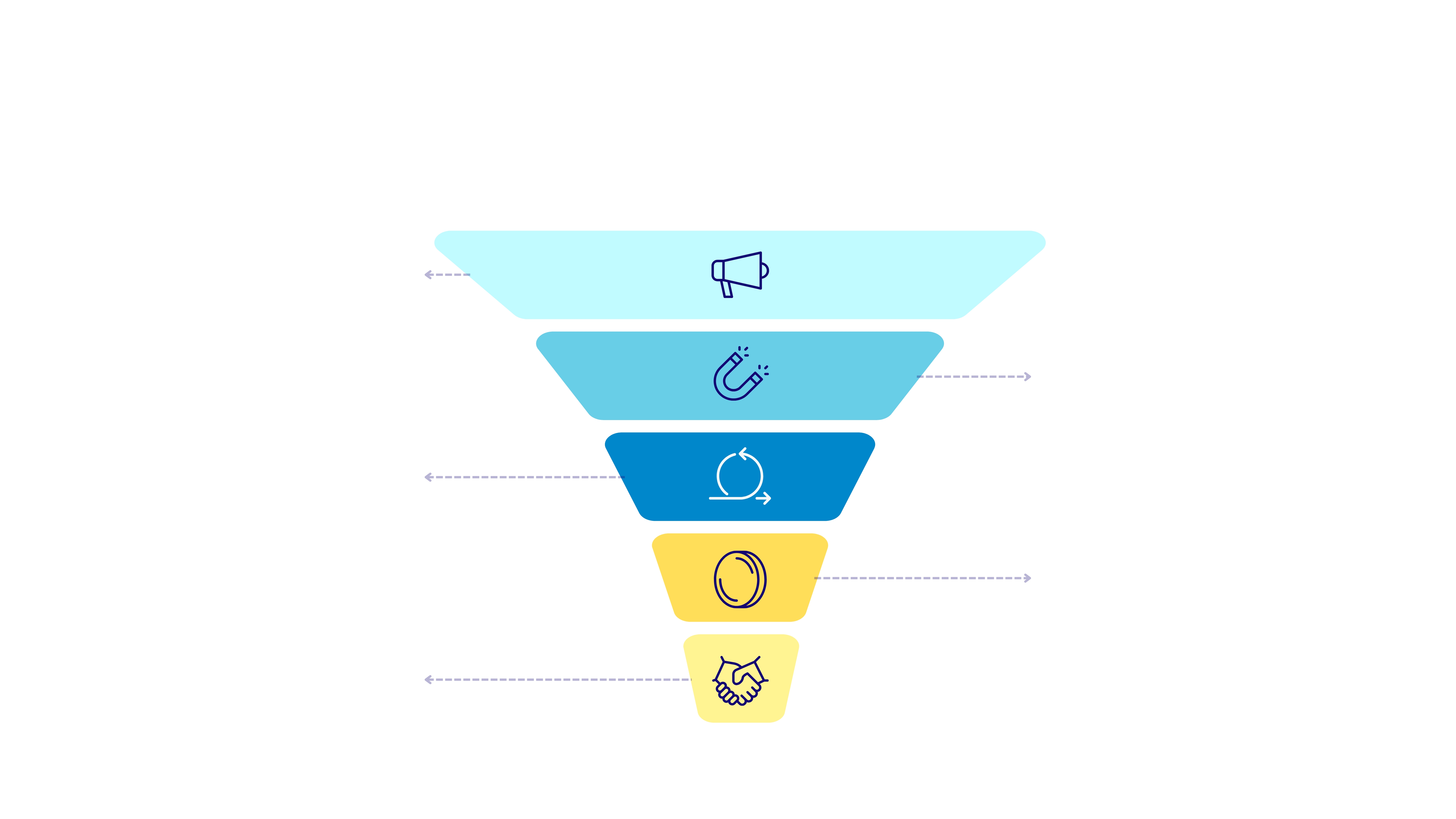
You don’t need to pay for email analytics separately. These platforms include comprehensive analytics in their free tiers:
Mailchimp Free
Price: Free (500 contacts, 1,000 sends per month)
Analytics included: Open rate, CTR, bounce rate, unsubscribes, click maps, device stats, geographic data
Mailchimp’s free plan includes more analytics than many paid tools. You get per-campaign reports showing opens, clicks, bounces, and unsubscribes. Furthermore, click maps show exactly which links received the most clicks, and you can compare campaign performance over time. The 500-contact limit is tight, but for small businesses just starting with email, it’s a solid foundation.
What you get free: Campaign reports, audience insights, click maps, open/click trends over time, A/B testing for subject lines (2 variants), basic automation analytics, landing page performance.
Brevo (formerly Sendinblue) Free
Price: Free (unlimited contacts, 300 emails per day)
Analytics included: Open rate, CTR, heatmaps, real-time statistics, device reports
Brevo’s free plan stands out because it allows unlimited contacts — you only pay based on send volume. At 300 emails per day (about 9,000 per month), it works well for businesses with larger lists but lower send frequency. In addition, Brevo includes email heatmaps showing where recipients clicked within your email, which is valuable for optimizing email design.
What you get free: Unlimited contacts, real-time campaign statistics, email heatmaps, open and click tracking, transactional email analytics, basic automation analytics.
MailerLite Free
Price: Free (1,000 subscribers, 12,000 sends per month)
Analytics included: Open rate, CTR, click maps, subscriber activity, campaign comparison
MailerLite’s free plan is the best balance of contacts and sends — 1,000 subscribers with 12,000 monthly sends gives you plenty of room. The analytics include campaign reports, click maps, opens by location, and subscriber engagement scores. Consequently, you can identify your most engaged subscribers and your least engaged ones (for cleanup). MailerLite also includes A/B testing on subject lines and content, making it the most feature-rich free option.
What you get free: Campaign performance reports, click maps, subscriber activity log, open/click rates by location, A/B testing (subject lines and content), automation analytics, landing page and form analytics.

Connecting Email Analytics to Website Data with UTM Parameters
Here’s where most small businesses miss a huge opportunity. Your email platform tells you who opened and clicked. But what happened after the click? Did they buy? Did they sign up? Did they bounce?
The answer is UTM parameters. Add UTM tags to every link in your emails:
https://yoursite.com/sale?utm_source=mailchimp&utm_medium=email&utm_campaign=march_newsletterThen in GA4, navigate to Reports → Acquisition → Traffic acquisition. You’ll see exactly how much traffic, how many conversions, and how much revenue came from each email campaign. Therefore, you can calculate true ROI for every email you send — not just clicks, but actual business results.
This is free to set up and transforms your email marketing analytics from “people clicked” to “this email generated $500 in revenue.” That’s the difference between vanity metrics and business intelligence.
Building an Email Performance Dashboard in Looker Studio
For a unified view of your email analytics alongside website and social data, build a dashboard in Google Looker Studio. Here’s a practical setup:
- Data source: Export email campaign data to Google Sheets (most platforms offer CSV export)
- Key columns: Date, Campaign Name, Sent, Opens, Clicks, Unsubscribes, Revenue (from UTM tracking)
- Visualizations: CTR trend over time, open rate trend, top campaigns by clicks, revenue per email trend
- Combine with GA4 data: Show email traffic alongside organic, social, and paid traffic
This dashboard takes 20 minutes to set up and gives you a professional-looking email performance report. Furthermore, it’s sharable — send it to clients, stakeholders, or your boss. Include email data in your weekly analytics report for a complete marketing performance overview.
A/B Testing Your Emails for Free
All three free platforms above include some form of A/B testing. Mailchimp and MailerLite let you test subject lines (2 variants on the free plan). MailerLite also lets you test email content. Here’s what to test, in order of impact:
- Subject lines: The biggest lever. A better subject line can increase open rates by 20-50%.
- Send time: Test Tuesday morning vs Thursday afternoon. Different audiences prefer different times.
- From name: “Alex at StatsCheap” vs “StatsCheap Newsletter” — personal names usually win.
- Email length: Short and punchy vs detailed and thorough. Test both.
- CTA placement and text: “Read more” vs “Get the free guide” — specific CTAs outperform generic ones.
For more advanced testing strategies, see our guide on free A/B testing tools that work across email, web, and product.
Free vs Paid Email Analytics: The Honest Comparison
| Feature | Free Tools | Paid (Klaviyo/ActiveCampaign) |
|---|---|---|
| Open/click tracking | Yes (all platforms) | Yes |
| A/B testing | Basic (subject lines) | Advanced (content, timing, segments) |
| Revenue attribution | Manual (UTM + GA4) | Automatic (platform integration) |
| Subscriber scoring | Basic (MailerLite) | AI-powered engagement scoring |
| Predictive analytics | Not available | Churn prediction, send-time optimization |
| Contact limit | 500-1,000 (Mailchimp/MailerLite) | Based on plan |
| Monthly cost | $0 | $15–$200+ |
Paid tools automate what free tools require you to do manually — especially revenue attribution and advanced segmentation. However, the core analytics (opens, clicks, unsubscribes, A/B testing) are fully available for free. Upgrade when your list outgrows the free tier’s contact limits, not because you need better analytics.
Frequently Asked Questions
Is Mailchimp free really free?
Yes, but with strict limits: 500 contacts and 1,000 sends per month. If you exceed either, you’ll need to upgrade to the Essentials plan starting at $13/month. Furthermore, the free plan includes Mailchimp branding in your emails and limits you to one audience (list). For businesses under 500 contacts, it’s genuinely free and surprisingly full-featured.
How accurate are email open rates in 2026?
Less accurate than they used to be. Apple Mail Privacy Protection (introduced with iOS 15) pre-loads tracking pixels, inflating open rates. If a large portion of your audience uses Apple Mail, your open rate could be 10-20 points higher than the real number. Therefore, focus on click-through rate as your primary metric — it requires actual human action and isn’t affected by privacy features. For a broader analytics perspective, check our guide to free web analytics tools.
Should I track revenue per email?
Absolutely — if you sell products or services directly via email. Revenue per email tells you the exact value of each subscriber and each send. It transforms email from a “brand awareness” channel into a measurable revenue driver. Set up UTM tracking on your email links, connect to GA4 e-commerce tracking, and you can calculate this for free. Even service businesses can track leads per email as a revenue proxy.
Your Free Email Marketing Analytics Action Plan
Stop overpaying for email analytics. Here’s what to do today:
- Choose your free email platform: Mailchimp (500 contacts), Brevo (unlimited contacts, 300/day), or MailerLite (1,000 contacts, 12K sends). ($0)
- Focus on CTR, not open rate as your primary metric — it’s more accurate and more actionable. ($0)
- Add UTM parameters to every email link to connect clicks to conversions in GA4. ($0)
- Run your first A/B test on subject lines — all three platforms offer this free. ($0)
- Build a Looker Studio dashboard combining email and website data for the complete picture. ($0)
- Include email data in your weekly report to track trends and identify winning campaigns. ($0)
Total cost: $0. Your email platform already has the analytics you need — you just need to know which metrics matter and how to connect email data to your website analytics. That’s email marketing analytics on a budget, and it works exactly as well as the expensive version.