


Your competitors know their traffic numbers, their top keywords, and their conversion rates. Shouldn’t you know theirs too? The catch is that tools like SEMrush charge $129/month and Ahrefs costs $139/month — that’s over $1,500 per year just to peek at competitor data. But here’s what most small businesses don’t realize: you can get roughly 80% of that intelligence using free competitor analysis tools. It’s not as polished or automated, but the data is there if you know where to look.
In this guide, I’ll walk you through six free tools that reveal your competitors’ traffic, keywords, content strategy, tech stack, and social media growth. Furthermore, I’ll give you a step-by-step process and a Google Sheets template to organize everything. By the end, you’ll have a competitive intelligence system that costs nothing and takes just 15 minutes per month to maintain.
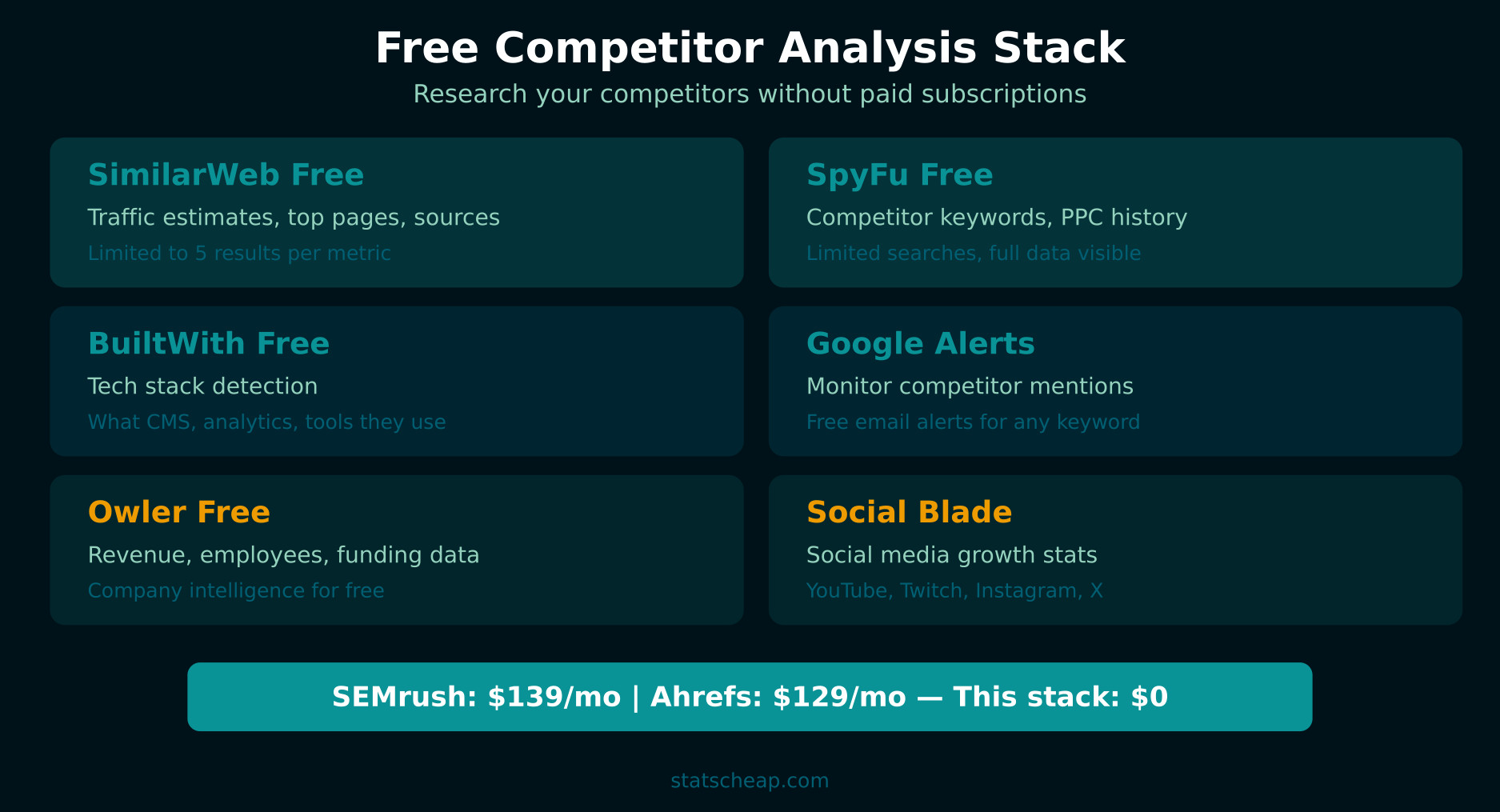
6 Free Competitor Analysis Tools That Reveal Real Data
Each of these tools provides a different piece of the competitive puzzle. Used together, they give you a comprehensive view of what your competitors are doing — and where you can beat them.
1. SimilarWeb Free — Traffic Estimates and Audience Insights
Free tier: 5 results per metric, 1 month of data, limited comparisons
Best for: Estimating competitor traffic volume and sources
URL: similarweb.com
SimilarWeb’s free version gives you estimated monthly traffic, traffic sources (direct, search, social, referral), geographic breakdown, and top referring sites for any domain. The numbers aren’t exact — they’re estimates based on panel data and statistical modeling — but they’re directionally accurate. If SimilarWeb says a competitor gets 50K monthly visits and you get 10K, you know there’s a significant gap even if the exact numbers are off. Additionally, seeing their traffic sources tells you which channels are working for them, which you can then replicate.
What you get free: Monthly visit estimates, traffic source breakdown, top 5 referring sites, top 5 organic keywords, top 5 paid keywords, geographic distribution, bounce rate estimate.
2. SpyFu Free — Competitor Keywords and PPC Intelligence
Free tier: Limited results per search, basic competitor reports
Best for: Finding competitor keywords, PPC ad history, SEO gaps
URL: spyfu.com
SpyFu is the best free tool for keyword intelligence. Enter a competitor’s domain and you’ll see their top organic keywords, their estimated monthly SEO clicks, and their Google Ads history. The free version limits results, but you can see enough to identify their keyword strategy. Furthermore, SpyFu’s “Kombat” feature shows keywords that competitors rank for but you don’t — these are your content gaps and your biggest opportunities.
What you get free: Top organic keywords, top paid keywords, estimated organic clicks, SEO keyword overlap analysis, historical PPC data, competitor ad copy examples.
3. BuiltWith Free — Technology Stack Detection
Free tier: Full technology profile for any site
Best for: Discovering what technology competitors use
BuiltWith reveals the entire technology stack behind any website — their CMS, analytics tools, marketing automation, A/B testing platforms, CDN, hosting provider, and more. This is valuable because it shows you what tools successful competitors invest in. If three competitors all use the same email marketing tool, there’s probably a reason. Additionally, finding competitors who use expensive enterprise tools tells you they’re well-funded — while those using free tools suggest a more budget-conscious operation like yours.
What you get free: Complete technology profile including CMS, analytics, marketing tools, frameworks, hosting, CDN, widgets, payment processors, and historical technology changes.

4. Google Alerts — Free Competitor Monitoring on Autopilot
Free tier: Unlimited alerts
Best for: Monitoring competitor mentions, new content, and PR
Google Alerts is the most underrated free competitor analysis tool. Set up an alert for each competitor’s brand name, and Google will email you whenever they’re mentioned online. You’ll see their guest posts, press coverage, product launches, and partnerships — all delivered to your inbox automatically. Furthermore, set alerts for your industry’s key terms to catch trends before competitors do. This costs nothing and runs entirely on autopilot.
How to set it up: Go to google.com/alerts, enter your competitor’s brand name, choose “As-it-happens” or “Once a day” delivery, and select “All results” for comprehensive coverage. Create one alert per competitor and one for each major industry keyword.
5. Owler Free — Company Intelligence and Revenue Estimates
Free tier: Basic company profiles, estimated revenue, employee counts
Best for: Understanding competitor company size and growth
Owler provides company-level intelligence — estimated annual revenue, employee count, funding history, and key leadership. This context is important because it tells you whether you’re competing with a bootstrapped startup or a VC-backed company with unlimited marketing budget. Consequently, you can set realistic expectations about what you can match and where you need to differentiate. Owler’s community-verified data is surprisingly accurate for well-known companies.
6. Social Blade — Social Media Growth Analytics
Free tier: Unlimited lookups, historical data
Best for: Tracking competitor social media follower growth and engagement trends
Social Blade tracks YouTube, Instagram, Twitter, TikTok, and Twitch growth over time. Enter a competitor’s social handle and you’ll see their follower trajectory, estimated engagement rates, and growth velocity. This tells you whether a competitor’s social presence is growing or stagnating. Additionally, spotting sudden follower spikes can reveal successful campaigns or viral content you can learn from. For deeper social analytics, combine Social Blade with insights from free social media analytics tools.

Step-by-Step Competitive Analysis Process
Having tools is one thing — using them systematically is another. Here’s the process I follow every month for my clients. It takes about 30 minutes the first time and 15 minutes for monthly updates.
Step 1: Identify Your Top 3-5 Competitors
Don’t track too many. Pick 3 direct competitors (same products, same market) and 1-2 aspirational competitors (where you want to be in 2 years). Search your main keywords in Google and note who appears consistently. Furthermore, ask your customers who else they considered — these are your real competitors, not just the ones you think about.
Step 2: Build Your Tracking Spreadsheet
Create a Google Sheet with these columns for each competitor:
- Competitor name and URL
- Estimated monthly traffic (from SimilarWeb)
- Top 5 keywords (from SpyFu)
- Content frequency (check their blog — posts per week/month)
- Social followers (from Social Blade — note platform and count)
- Tech stack highlights (from BuiltWith — CMS, analytics, marketing tools)
- Recent moves (from Google Alerts — new products, press, partnerships)
This template gives you a living competitive intelligence document. Update it monthly and you’ll spot trends that one-time analysis misses. You can connect this data to a Looker Studio dashboard for visualization.
Step 3: Find Content Gaps
This is where the real value lives. Use SpyFu’s free keyword overlap feature to find keywords your competitors rank for that you don’t. These are content opportunities — topics your audience is searching for that you haven’t covered yet. Furthermore, look at your competitors’ most-shared content (check their blog for social share counts) to identify formats and topics that resonate with your shared audience.
Step 4: Analyze Their Traffic Sources
SimilarWeb’s traffic source breakdown reveals your competitors’ channel strategy. If a competitor gets 60% of traffic from organic search, they’re investing heavily in SEO. If another gets 40% from social, they’re prioritizing community building. This tells you where to focus your own efforts — especially if you find a channel that no competitor is using well. Track your own traffic sources with UTM parameters for comparison.
Step 5: Monthly 15-Minute Review
Every month, spend 15 minutes updating your spreadsheet:
- Check SimilarWeb for traffic changes (5 minutes)
- Review Google Alerts for new competitor moves (5 minutes)
- Update Social Blade follower counts (3 minutes)
- Note any new content or product launches (2 minutes)
Consistency is the key to competitive intelligence. A monthly cadence catches trends without consuming your entire week. Add competitor insights to your weekly analytics report for a complete marketing picture.
How to Find Content Gaps (What Competitors Rank For That You Don’t)
Content gaps are your biggest growth opportunities. Here’s a practical approach using free tools:
- Run SpyFu’s free keyword tool on each competitor’s domain. Export their top organic keywords.
- Cross-reference with your own keywords in Google Search Console (completely free). Look for keywords they rank for that you don’t appear for at all.
- Prioritize by search volume and difficulty. Focus on keywords with decent volume (100+ monthly searches) that aren’t extremely competitive.
- Create content for the top 3-5 gaps. Write articles targeting these keywords, using your competitors’ content as inspiration (not copying).
- Track results with free rank tracking tools to see if your new content is ranking.
This process alone can generate months of content ideas. Furthermore, because you’re targeting proven keywords (competitors already rank for them), you know there’s search demand — you’re not guessing.
Frequently Asked Questions
How many competitors should I track?
Track 3-5 maximum. More than that becomes overwhelming and the data loses focus. Pick 3 direct competitors (similar size, similar market) and optionally 1-2 aspirational competitors (larger companies in your space). Quality of analysis beats quantity of competitors every time. Furthermore, tracking too many competitors spreads your attention thin — you’ll spot more insights from deep analysis of 3 competitors than surface analysis of 10.
Is SimilarWeb data accurate?
Directionally, yes. Precisely, no. SimilarWeb estimates are based on panel data and statistical modeling, which means they’re useful for relative comparisons but shouldn’t be treated as exact numbers. If SimilarWeb says Competitor A gets 100K visits and Competitor B gets 20K, you can confidently say A is significantly larger. However, the actual numbers could be off by 30-50%. Use SimilarWeb for trends and relative sizing, not precise traffic counts.
Can I see competitor ad spend for free?
SpyFu provides estimated monthly PPC spend on its free tier, though with limited detail. You can see whether a competitor is running Google Ads, their estimated monthly budget, and examples of their ad copy. For exact spend data, you’d need a paid tool like SEMrush. However, knowing that a competitor spends “around $5,000/month” on PPC is useful enough for strategic planning — you don’t need the exact number.
Your Free Competitor Analysis Action Plan
Stop flying blind. Here’s how to set up your competitive intelligence system today:
- Identify 3-5 competitors — search your main keywords and note who appears consistently. (5 minutes, $0)
- Create your tracking spreadsheet in Google Sheets with the template columns listed above. (10 minutes, $0)
- Run SimilarWeb on each competitor for traffic estimates and source breakdowns. (10 minutes, $0)
- Run SpyFu on each competitor for keyword data and content gap analysis. (10 minutes, $0)
- Set up Google Alerts for each competitor’s brand name. (5 minutes, $0)
- Schedule a monthly 15-minute review to update your spreadsheet and spot trends. ($0)
Total cost: $0/month. Total setup time: about 40 minutes. You’ll know what your competitors are doing, where their traffic comes from, and where the content gaps are. That’s free competitor analysis that delivers 80% of what the expensive tools offer — and for most small businesses, 80% is more than enough.