


Kissmetrics charges $299/month. Heap starts at $65/month. Glew.io begins at $79/month. If you’re running an online store, the analytics tools designed for e-commerce seem to assume you’re already making serious money. But here’s the thing: you can track every important revenue metric — from average order value to cart abandonment — without paying for any of these tools. Free e-commerce analytics isn’t a compromise. It’s a smart starting point.
I’ve helped dozens of small e-commerce businesses set up analytics, and the pattern is always the same. They sign up for an expensive tool, use 10% of its features, and feel guilty about the monthly charge. Meanwhile, free alternatives cover exactly what they need. Let’s break down what those alternatives are and how to use them.
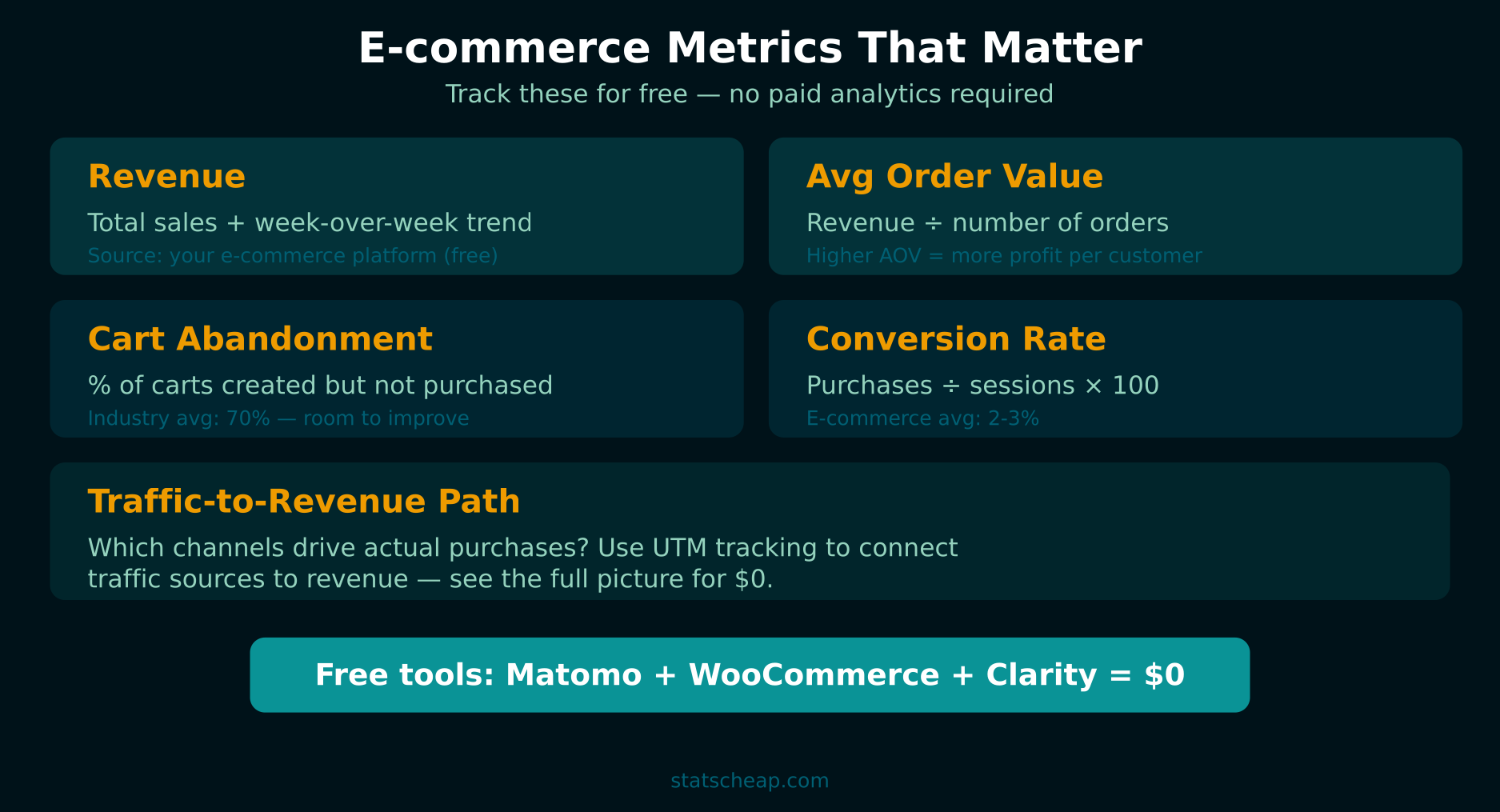
5 E-commerce Metrics You Must Track (Even on a Budget)
Before diving into tools, let’s clarify what actually matters. You don’t need 50 dashboard widgets. You need these five numbers:
- Revenue (and Revenue by Source): Total sales, broken down by where customers came from. This is the metric that pays your bills. Track it daily.
- Average Order Value (AOV): Total revenue ÷ number of orders. A rising AOV means your upselling or cross-selling is working. A falling AOV means you need to investigate.
- Cart Abandonment Rate: The percentage of shoppers who add items to their cart but don’t complete checkout. Industry average is 70%. If yours is higher, you’re leaving money on the table.
- Conversion Rate: Visitors who actually buy ÷ total visitors. E-commerce average is 2-3%. Know yours.
- Traffic-to-Revenue Path: Which traffic sources (organic, social, email, paid) generate the most revenue per visitor. This tells you where to invest your time.
Everything else is nice to have. These five metrics tell you whether your store is healthy, growing, or in trouble. Furthermore, every tool below tracks at least three of them for free.
Free E-commerce Analytics Tools That Actually Work
Matomo (Self-Hosted) — The Complete Free Alternative
Price: Free (self-hosted, unlimited)
Best for: Store owners who want full analytics ownership
E-commerce tracking: Full (revenue, products, categories, cart abandonment)
Matomo is the most powerful free analytics platform for e-commerce. The self-hosted version is completely free with no data limits, and it includes a dedicated e-commerce module that tracks revenue, products, categories, and cart abandonment out of the box. Therefore, if you have a server (or your hosting supports PHP/MySQL), Matomo replaces tools costing hundreds per month.
What you get free: Full e-commerce reporting, real-time analytics, goal tracking, custom dimensions, heatmaps (via plugin), session recording (via plugin), GDPR compliance tools, and complete data ownership. No sampling, no data limits, no usage caps.
The trade-off? You host it yourself, which means server maintenance. However, for anyone comfortable with basic WordPress hosting, Matomo’s installation is similar — a PHP app with a MySQL database. Most web hosts can handle it alongside your store.
Mixpanel Free Tier — Event-Based E-commerce Analytics
Price: Free (up to 20 million events/month)
Best for: Tracking specific customer actions and funnels
E-commerce tracking: Custom (you define events)
Mixpanel’s free tier gives you 20 million events per month — more than enough for most small to mid-sized stores. Unlike traditional analytics tools, Mixpanel focuses on events: “added to cart,” “completed checkout,” “viewed product.” As a result, it’s excellent for building conversion funnels and understanding where customers drop off.
What you get free: 20M events/month, unlimited saved reports, funnel analysis, retention analysis, user segmentation. The free tier has no time limit and includes core analytics features. You lose A/B testing and advanced modeling, but the fundamentals are solid.

WooCommerce Built-In Reports — Already in Your Dashboard
Price: Free (included with WooCommerce)
Best for: WooCommerce store owners who want quick insights
E-commerce tracking: Revenue, orders, products, categories
If you run WooCommerce, you already have analytics. WooCommerce’s built-in reporting includes revenue trends, top products, order counts, coupon usage, and tax summaries. Furthermore, WooCommerce 8.0+ includes an improved Analytics section with more detailed reports on revenue, orders, products, categories, coupons, taxes, and downloads.
What you get free: Revenue reports, order reports, product performance, category performance, coupon tracking, customer reports. It’s basic compared to dedicated tools, but it answers the fundamental question: “How much am I selling?”
Shopify Analytics — Included With Every Plan
Price: Free (included with all Shopify plans)
Best for: Shopify store owners at any plan level
E-commerce tracking: Full revenue, products, customers, marketing
Shopify includes analytics with every plan, and even the Basic plan gives you an overview dashboard, finance reports, product analytics, and acquisition reports. Higher plans unlock more detailed reports, but the basics cover revenue tracking, customer behavior, and marketing performance. In addition, Shopify automatically tracks cart abandonment and sends recovery emails.
What you get free (with any Shopify plan): Overview dashboard, finance reports, acquisition reports, behavior reports, marketing reports, live view. The analytics improve as you upgrade plans, but even Basic Shopify covers the 5 essential metrics above.
Platform-Specific Analytics — Etsy, Squarespace, BigCommerce
Price: Included with platform fees
Best for: Sellers on marketplace and hosted platforms
Every major e-commerce platform includes basic analytics. Etsy’s Shop Stats show views, visits, orders, and revenue with traffic source breakdowns. Squarespace includes detailed commerce analytics with product performance, purchase funnels, and abandoned cart tracking. BigCommerce offers built-in analytics covering orders, customers, and marketing. Consequently, you likely already have more data than you realize — check your platform’s analytics section before paying for anything new.
Using Microsoft Clarity for Free E-commerce Heatmaps
Numbers tell you what is happening. Heatmaps show you why. Microsoft Clarity is a completely free heatmap and session recording tool that works on any e-commerce platform. Install it on your product pages and checkout flow to see:
- Where customers click (and where they don’t click) on product pages
- How far down the page they scroll before leaving
- Where in the checkout process they abandon their cart
- Session recordings of real customer journeys through your store
This is the kind of insight that paid tools like Hotjar charge $39/month for. Clarity does it for $0/month with unlimited recordings and heatmaps. Read our Clarity vs Hotjar comparison for a detailed breakdown.

Connecting Traffic Sources to Revenue with UTM Parameters
The most common gap in free e-commerce analytics is attribution — knowing which marketing channel drives the most revenue. Google Analytics can track this, but only if you properly tag your links with UTM parameters.
For example, tag your email campaign links with utm_source=email&utm_medium=newsletter&utm_campaign=spring_sale. Tag your Instagram bio link with utm_source=instagram&utm_medium=social. Then in GA4, navigate to Acquisition → Traffic acquisition to see revenue broken down by source. As a result, you’ll know exactly which channels deserve more of your time and budget.
This costs nothing to implement and transforms your free analytics setup from “I know my total revenue” to “I know which marketing efforts generate the most revenue.” That’s the difference between data and insight.
Building an E-commerce Dashboard in Looker Studio
Once you have data flowing from multiple free tools, pull it all together in Google Looker Studio. Connect GA4 for website traffic and conversions, import WooCommerce/Shopify data via CSV or Google Sheets, and build a single dashboard showing:
- Daily/weekly/monthly revenue trends
- Conversion rate over time
- Traffic sources ranked by revenue generated
- Top products by revenue and units sold
- Cart abandonment rate trends
This dashboard replaces the $299/month tool your competitor is paying for. It takes 45 minutes to build initially, then updates automatically or with minimal manual effort. Furthermore, you can share it with business partners or investors as a professional-looking report.
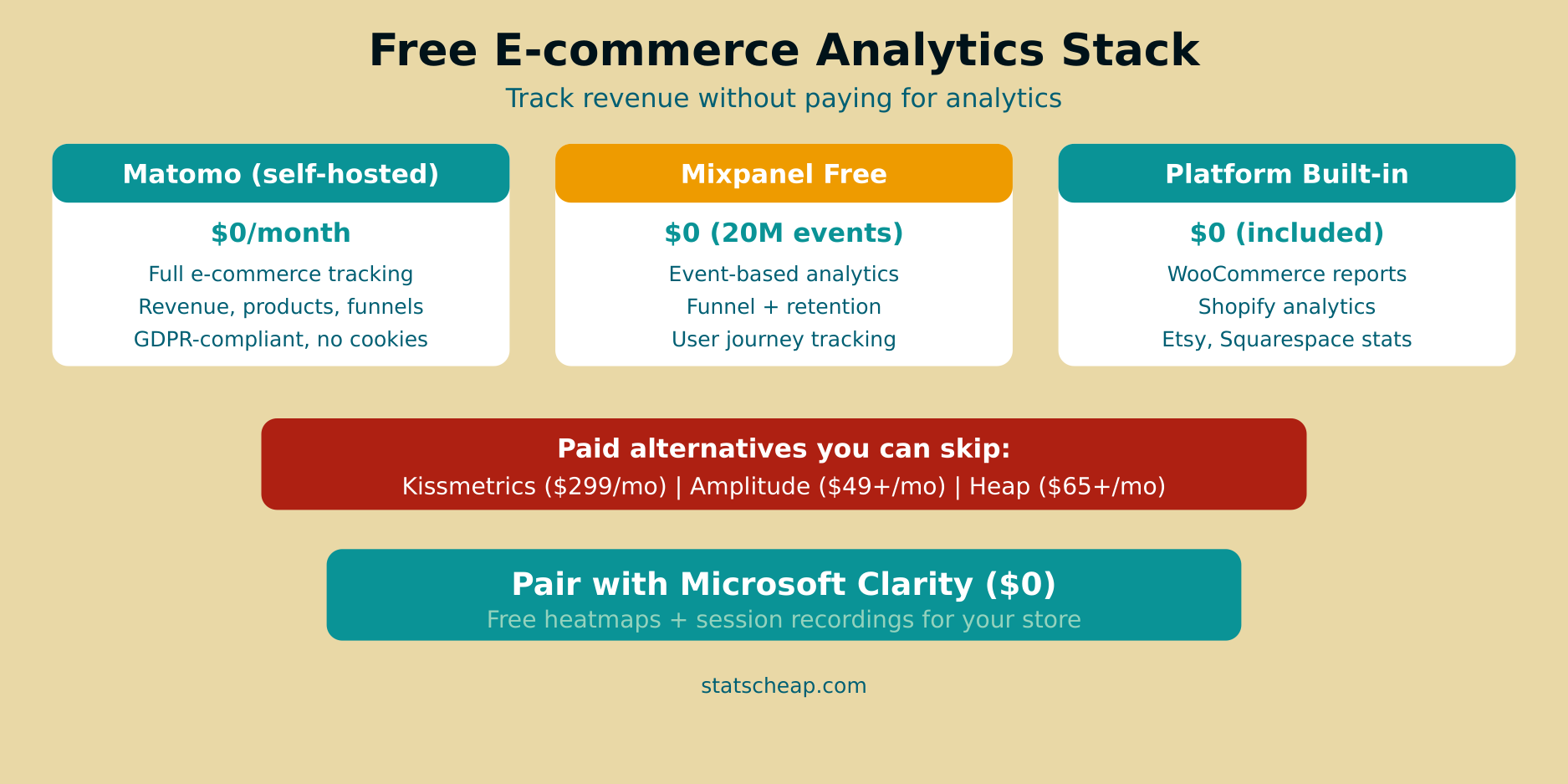
Free vs Paid E-commerce Analytics: The Honest Comparison
| Feature | Free Stack | Paid (Kissmetrics/Heap) |
|---|---|---|
| Revenue tracking | Yes (all platforms) | Yes (automated) |
| Product analytics | Yes (platform built-in) | Yes (deeper) |
| Cart abandonment | Basic (platform + Clarity) | Advanced with recovery |
| Customer segmentation | Manual or Mixpanel free | Automated AI segments |
| Attribution | UTM + GA4 | Multi-touch attribution |
| Heatmaps | Clarity (unlimited, free) | Often extra cost |
| Monthly cost | $0 | $65–$299 |
Paid tools offer more convenience and automation. However, the core data is available for free. You trade convenience for cost savings — and for most small e-commerce businesses doing under $50K/month in revenue, that trade-off makes sense.
Frequently Asked Questions
Can Matomo really replace paid e-commerce analytics?
For most small to mid-sized stores, yes. Matomo’s self-hosted version includes full e-commerce tracking: revenue, products, categories, cart abandonment, and customer profiles. It doesn’t have Kissmetrics’ predictive analytics or Heap’s auto-capture, but it covers all the essential metrics. The main cost is hosting (which you’re already paying for if you run a website) and the time to install it.
What about WooCommerce analytics plugins?
WooCommerce’s built-in analytics cover the basics. Free plugins like Enhanced E-Commerce for WooCommerce connect your store to GA4’s e-commerce tracking, which adds funnel visualization and product performance insights. Therefore, before paying for a premium analytics plugin, make sure you’ve fully utilized the free GA4 integration — it’s more powerful than most people realize.
How do I track cart abandonment for free?
Three free methods: First, WooCommerce and Shopify both track abandonment natively. Second, set up a GA4 funnel from “add to cart” to “purchase” to see your drop-off rate. Third, use Microsoft Clarity session recordings to watch real customers abandon their carts — you’ll see exactly where and why they leave. Combined, these give you both the numbers and the visual context.
Your Free E-commerce Analytics Action Plan
Stop paying for analytics you don’t need. Here’s what to do, in order:
- Check your platform’s built-in analytics — WooCommerce, Shopify, Etsy, or whatever you use. You probably have more data than you think. ($0)
- Set up GA4 with e-commerce tracking — connect it to your store for traffic and conversion data. ($0)
- Install Microsoft Clarity — free heatmaps and recordings on your product and checkout pages. ($0)
- Tag all marketing links with UTM parameters — connect traffic sources to revenue. ($0)
- Build a Looker Studio dashboard — pull everything into one view. ($0)
- Consider Matomo if you want complete data ownership and deeper analytics. ($0 self-hosted)
Total cost: $0. Total setup time: about 2 hours. That’s free e-commerce analytics that covers revenue, conversions, customer behavior, and attribution — everything you need to grow your store without growing your expenses. Check our complete guide to free web analytics tools for even more options.