

Ahrefs costs $129/month. SEMrush costs $139. Moz Pro starts at $49. If you’re a small business owner watching your budget, those numbers sting — especially when all you really want is to know where your site ranks on Google and whether anything is broken. Good news: you can build a solid SEO monitoring setup for exactly $0. These 9 free rank tracking tools cover rankings, site audits, keyword research, and backlink analysis without a single subscription.
I’ve tested every free SEO tool I could find, and most are either too limited or too clunky to be useful. The nine tools below are the ones that actually deliver value. Combined, they replace about 80% of what you’d get from a paid SEO suite — for zero dollars.

The 9 Best Free Rank Tracking and SEO Tools
1. Google Search Console — The Foundation
Price: Free (unlimited)
Best for: Everyone. Non-negotiable.
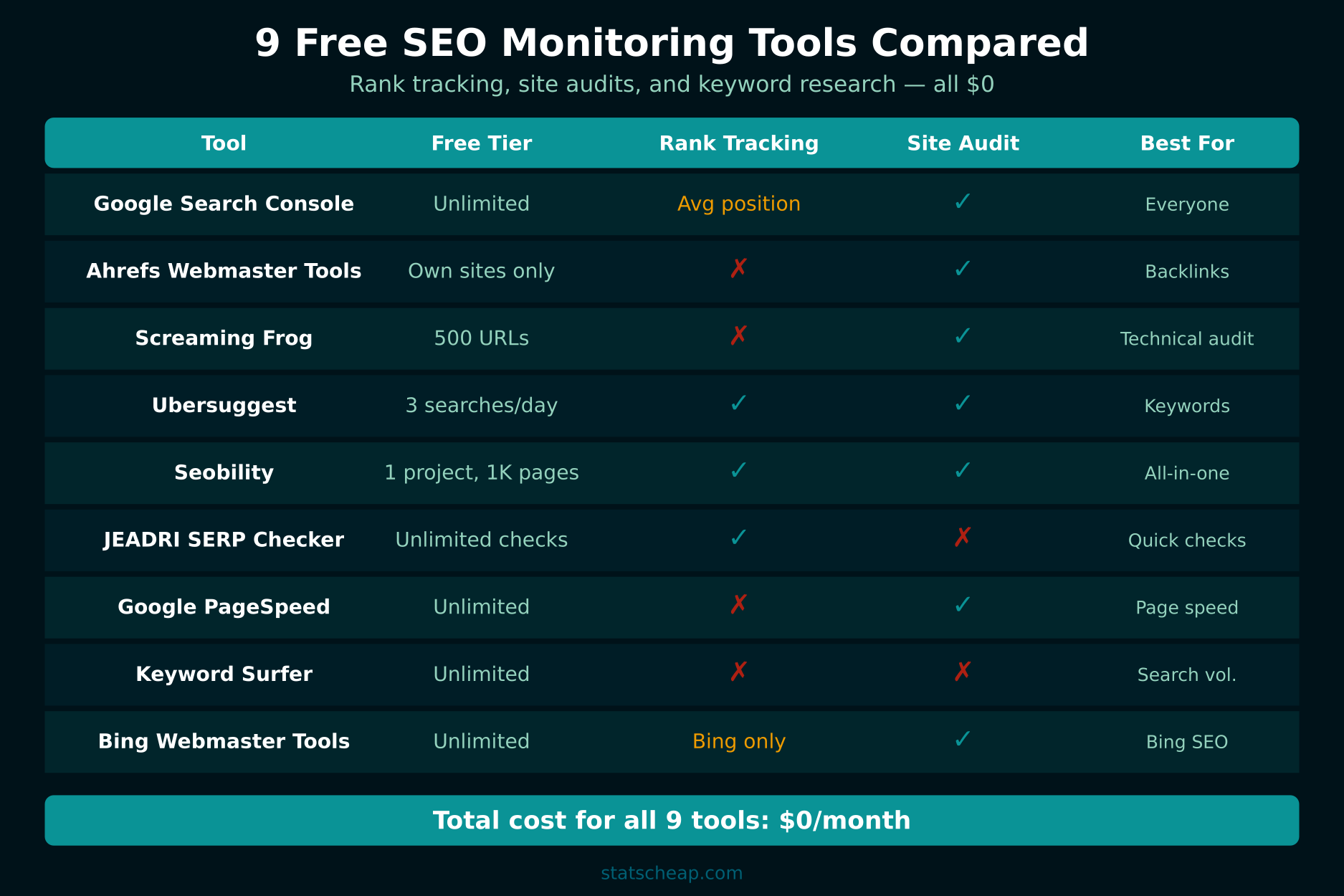
Search Console is the single most important free SEO tool. It shows you exactly which queries bring visitors to your site, your average position for each query, click-through rates, and indexing issues. It doesn’t track specific keyword positions daily like paid tools, but the “average position” metric over time gives you reliable trend data.
What you get free: Search queries and clicks, page performance, Core Web Vitals, mobile usability, index coverage, sitemap management, manual action alerts. Pair it with Looker Studio to build an automated SEO dashboard for free.
2. Ahrefs Webmaster Tools — Free Backlink Data
Price: Free (your own verified sites only)
Best for: Backlink analysis and technical site audit
Ahrefs Webmaster Tools gives you access to two of Ahrefs’ paid features for free — but only for sites you own and verify. You get the Site Audit tool (crawls your site for 100+ SEO issues) and the Site Explorer (shows your backlinks, referring domains, and organic keywords). You can’t research competitors, but for monitoring your own site, it’s incredibly powerful.
What you get free: Full site audit, backlink profile, referring domains, broken links, organic keywords your site ranks for. The audit alone would cost $99/month on the paid plan.
3. Screaming Frog SEO Spider — Technical Audit Powerhouse
Price: Free (up to 500 URLs)
Best for: Deep technical SEO audits
Screaming Frog is a desktop application that crawls your website and reports every technical issue: broken links, missing meta tags, duplicate content, redirect chains, image optimization, and more. The free version crawls up to 500 URLs — more than enough for most small business sites. For larger sites, the paid version is $259/year.
What you get free: Full crawl of up to 500 pages, broken link detection, meta tag analysis, heading hierarchy audit, redirect chain detection, image alt text checker.
4. Ubersuggest — Keyword Research Starter
Price: Free (3 searches per day)
Best for: Quick keyword research and competitor overview
Neil Patel’s Ubersuggest gives you keyword search volume, SEO difficulty, and content ideas. The free version limits you to three daily searches, but that’s enough for weekly keyword research sessions. It also shows basic competitor data — which keywords competitors rank for and their top pages.
What you get free: Search volume, keyword difficulty, content ideas, competitor top pages, basic site audit. The daily limit forces you to be strategic about what you search — which isn’t necessarily a bad thing.
5. Seobility — Best Free All-in-One
Price: Free (1 project, 1,000 pages, 10 tracked keywords)
Best for: Small businesses wanting one tool for everything
Seobility is the closest thing to a free SEO suite. The free tier includes a site audit (1,000 pages), rank tracking (10 keywords, checked weekly), on-page analysis, and basic backlink monitoring. For a single small business website, this covers most of your needs without paying anything.
What you get free: 1 project, 1,000 crawled pages, 10 tracked keywords (weekly updates), on-page SEO checker, TF*IDF analysis, basic backlink data.

6. Free SERP Checkers — Instant Rank Checks
Price: Free (unlimited manual checks)
Best for: Quick spot-checks of specific keyword rankings
Tools like Ahrefs’ free SERP checker, SERPWatcher’s free checker, and various other browser-based rank checkers let you instantly see where any domain ranks for a specific keyword. They don’t track over time, but they’re perfect for quick checks — “did my new blog post start ranking yet?” One search, instant answer.
What you get free: Real-time SERP position for any keyword, top 10 results with domain authority and backlink counts. No account needed for most.
7. Google PageSpeed Insights — Speed and Core Web Vitals
Price: Free (unlimited)
Best for: Page speed analysis and Core Web Vitals monitoring
Google’s own tool that tests any URL for speed and Core Web Vitals (LCP, FID, CLS). Since page speed is a ranking factor, regular monitoring matters. Run your key pages through it monthly and fix the issues flagged in the report. The suggestions are specific and actionable.
What you get free: Performance score (0-100), Core Web Vitals assessment, Lighthouse audit, specific optimization recommendations with estimated impact.
8. Keyword Surfer — Search Volume in Your Browser
Price: Free (Chrome extension, unlimited)
Best for: Passive keyword research while browsing
Keyword Surfer is a Chrome extension that shows search volume data right in your Google search results. Every time you Google something, you see monthly search volume, related keywords with their volumes, and estimated traffic for ranking pages. It’s not as accurate as paid tools, but it’s surprisingly good for spotting opportunities without any extra effort.
What you get free: Search volume overlay on Google results, related keyword suggestions, estimated traffic per page, content word count for ranking pages.
9. Bing Webmaster Tools — The Overlooked Extra
Price: Free (unlimited)
Best for: Bing SEO data plus additional keyword research tools
Most people ignore Bing, but Bing Webmaster Tools offers features that Search Console doesn’t — including a built-in keyword research tool, backlink data, and SEO reports. Bing also powers DuckDuckGo, Yahoo, and Ecosia, so you’re actually covering more search engines than you think. The keyword research tool alone is worth the 5-minute setup.
What you get free: Bing search queries and rankings, keyword research tool, backlink data, site scan, SEO reports, URL inspection.
Building Your Free SEO Monitoring Workflow
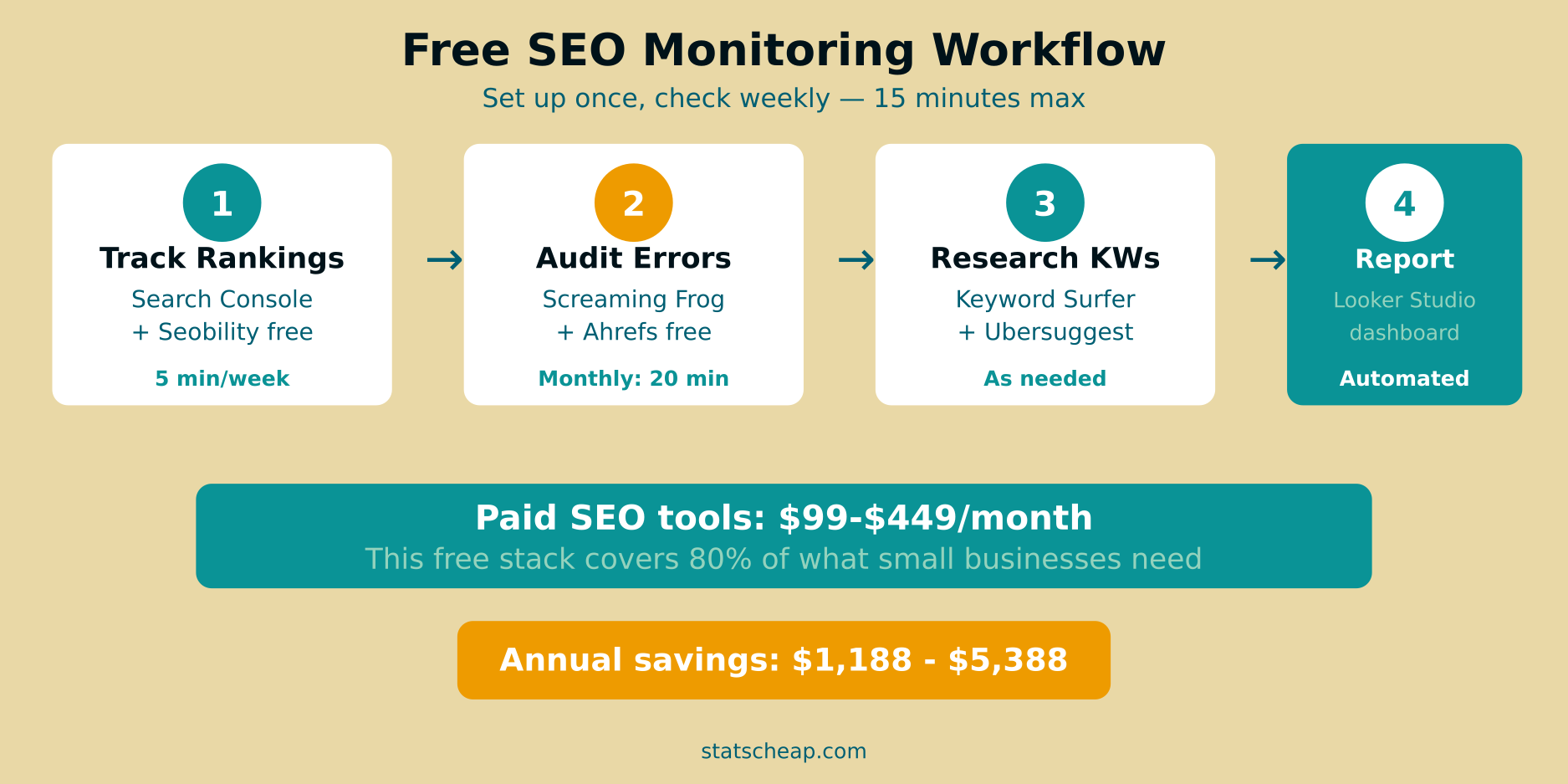
Having nine tools is useless without a system. Here’s the workflow I use for clients who refuse to pay for SEO software (and I don’t blame them):
Weekly (15 minutes)
- Check Search Console: Look at top queries, click trends, and any new coverage issues. Takes 5 minutes.
- Review Seobility rank tracking: Check your 10 tracked keywords for movement. Takes 3 minutes.
- Spot-check key rankings: Use a free SERP checker for your most important 3-5 keywords. Takes 5 minutes.
- Log it: Add the data to your weekly analytics report. Takes 2 minutes.
Monthly (30 minutes)
- Run Screaming Frog crawl: Check for new broken links, missing meta tags, or redirect issues. Fix what you find.
- Run Ahrefs Webmaster Tools audit: Compare to last month. Focus on new issues only.
- Check PageSpeed Insights: Test your homepage and top 3 landing pages. Watch for Core Web Vitals regressions.
- Keyword research session: Use Ubersuggest (3 searches) and Keyword Surfer to find new content opportunities.
Free vs Paid SEO Tools: The Real Difference
Let’s be honest about what you give up with free tools:
| Feature | Free Stack | Paid (Ahrefs/SEMrush) |
|---|---|---|
| Daily rank tracking | Weekly (Seobility) or manual | Daily, automated |
| Keyword database | Limited searches | Unlimited, billions of KWs |
| Competitor analysis | Basic (Ubersuggest) | Deep competitor intelligence |
| Backlink monitoring | Own sites only (Ahrefs free) | Any domain, historical data |
| Site audit | 500-1,000 pages | Unlimited pages |
| Historical data | Limited | Years of historical data |
| Price | $0/month | $99-$449/month |
The honest truth: paid tools are better. They save time, provide deeper data, and automate more. But for a small business with under 1,000 pages and a limited budget, the free stack covers what matters. You lose convenience, not capability. The data is still there — you just have to work slightly harder to get it.
For more on building a complete free analytics setup, see our guide on free web analytics tools and building a full analytics stack for $0.
Frequently Asked Questions
Can I really track rankings for free?
Yes. Google Search Console shows average positions for all your queries (free, unlimited). Seobility tracks 10 specific keywords weekly (free tier). Free SERP checkers give you instant position checks for any keyword. Combined, these free rank tracking tools cover most small business needs.
Which free SEO tool should I start with?
Google Search Console. Always. It’s the only tool that gives you actual Google data — not estimates. If you only set up one tool, make it Search Console. Add the others as you need them.
How accurate are free rank tracking tools?
Search Console data comes directly from Google, so it’s the most accurate source available. Third-party free tools (Seobility, SERP checkers) use their own crawlers and may show slightly different positions due to location, personalization, and timing. For trend monitoring (going up vs. going down), they’re reliable enough.
When should I upgrade to paid SEO tools?
When your business depends on SEO and you need competitive intelligence. If you’re actively trying to outrank specific competitors, need daily rank tracking for dozens of keywords, or manage multiple client sites — that’s when paid tools justify their cost. For a single small business site with under 50 target keywords, free tools are sufficient.
Bottom Line: $0 SEO Monitoring That Actually Works
You don’t need to spend $100+/month to monitor your SEO. Here’s your action plan:
- Set up Google Search Console — your non-negotiable baseline. ($0)
- Verify your site in Ahrefs Webmaster Tools — free backlink data and site audit. ($0)
- Create a Seobility free account — track 10 keywords weekly. ($0)
- Install Keyword Surfer — passive keyword research while browsing. ($0)
- Download Screaming Frog — monthly technical audits up to 500 URLs. ($0)
- Follow the weekly/monthly workflow above — 15 minutes weekly, 30 minutes monthly.
Nine tools, zero dollars, and a systematic workflow. That’s SEO monitoring on a budget — and it works. Track your rankings with UTM-tagged links to measure the full impact of your SEO efforts across your analytics stack.