

Hootsuite starts at $99/month. Sprout Social costs $199/month. Buffer’s paid plans begin at $5/channel/month. If you manage social media for a small business, those subscription costs add up fast. However, you don’t need to spend a single dollar to track what matters. These 8 free social media analytics tools go far beyond the built-in dashboards — and they cost exactly $0.
I’ve spent the past year testing every free analytics option for social media management. Most built-in platform dashboards give you vanity metrics and not much else. The tools below actually help you make smarter decisions about your content strategy — without a monthly subscription eating into your marketing budget.
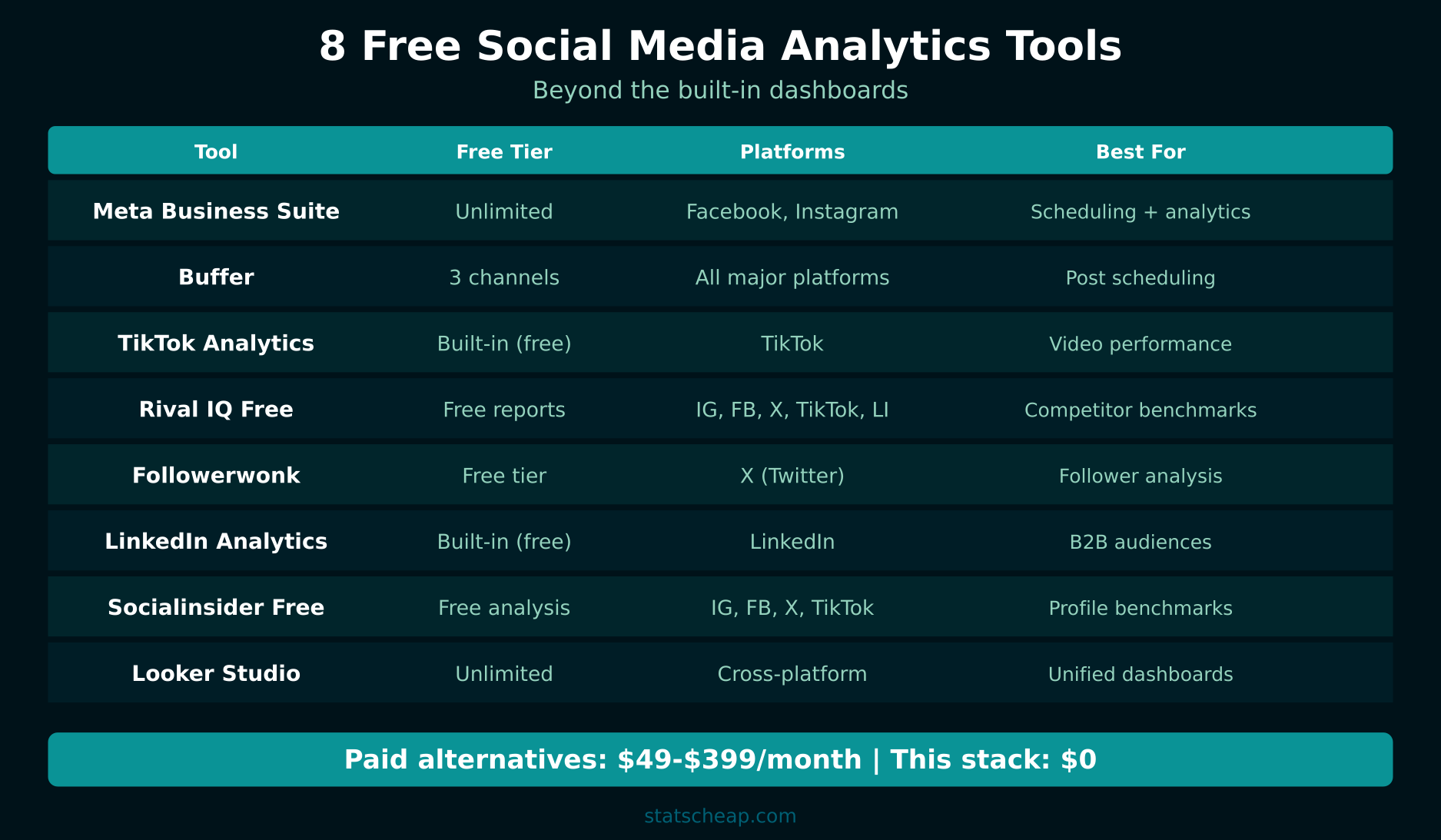
The 8 Best Free Social Media Analytics Tools
1. Meta Business Suite — The Facebook and Instagram Powerhouse
Price: Free (unlimited)
Platforms: Facebook, Instagram
Best for: Any business with a Facebook Page or Instagram Business account
Meta Business Suite is the most comprehensive free social media analytics tool available. It provides detailed insights on reach, engagement, follower demographics, and content performance across both Facebook and Instagram. Furthermore, it includes a content calendar, scheduling tools, and inbox management — all for free.
What you get: Post-level engagement metrics, audience demographics (age, gender, location), optimal posting times, story analytics, ad performance, and cross-platform content scheduling. For example, you can see exactly which posts drove the most link clicks and adjust your strategy accordingly.
2. Buffer Free — Simple Analytics for 3 Channels
Price: Free (3 social channels, 10 scheduled posts per channel)
Platforms: Facebook, Instagram, Twitter/X, LinkedIn, Pinterest, TikTok
Best for: Solo entrepreneurs managing a few accounts
Buffer’s free plan includes basic analytics alongside scheduling. You get engagement metrics, reach, and clicks for each post. Therefore, it works well as a lightweight scheduling-plus-analytics combo. The limitation is 3 channels and 10 queued posts per channel, but for a small business, that’s often enough.
What you get: Post performance metrics, best time to post suggestions, engagement tracking. The analytics aren’t as deep as Meta Business Suite, but the cross-platform view is valuable.
3. TikTok Analytics — Built-In but Underrated
Price: Free (Business or Creator account)
Platforms: TikTok
Best for: Anyone publishing TikTok content
TikTok’s built-in analytics are surprisingly detailed. Switch to a Business or Creator account (free) and you unlock video-level analytics, follower demographics, traffic source data, and trending content insights. In addition, you can see exactly when your followers are most active.
What you get: Video views, watch time, audience territories, follower growth, traffic sources (For You page vs. following vs. search), and trending sounds/hashtags in your niche.
4. Rival IQ Free Reports — Competitive Benchmarking
Price: Free (limited reports)
Platforms: Facebook, Instagram, Twitter/X, TikTok
Best for: Benchmarking your performance against competitors
Rival IQ publishes free social media benchmark reports by industry, and their free tool lets you run head-to-head comparisons against competitors. This is invaluable because your engagement rate means nothing without context. An average engagement rate of 1.5% might be excellent in B2B software but terrible in food and beverage.
What you get: Industry benchmarks for engagement rate, posting frequency, top content types, competitive landscape overviews.
5. Followerwonk — X/Twitter Deep Dive
Price: Free (1 profile, basic features)
Platforms: X (Twitter)
Best for: Twitter-heavy brands and personal accounts
Followerwonk analyzes your Twitter followers — when they’re online, their bios, locations, and authority levels. The free version covers one profile with basic analytics. Consequently, you can optimize your posting schedule based on when your actual audience is active, not when some generic guide tells you to post.
What you get: Follower activity heatmap, bio word clouds, follower/following comparison, social authority scoring.
6. LinkedIn Analytics — Professional Network Insights
Price: Free (Company Page required)
Platforms: LinkedIn
Best for: B2B businesses and professional brands
LinkedIn’s built-in analytics for Company Pages provide visitor demographics (job title, industry, company size), content performance, and follower growth trends. The demographics data is uniquely valuable — no other platform tells you the job titles of your audience for free. Therefore, B2B businesses should absolutely use these insights.
What you get: Visitor analytics with professional demographics, update analytics (impressions, clicks, engagement rate), follower analytics, competitor comparisons (up to 5 competitors).
7. Socialinsider Free Tools — Quick Audits
Price: Free (limited reports)
Platforms: Instagram, Facebook, Twitter/X, TikTok
Best for: Quick social media audits and benchmarks
Socialinsider offers free tools for Instagram audits, TikTok audits, and social media benchmarks. They’re limited in scope — you get a snapshot rather than ongoing tracking — but they’re useful for quarterly check-ins or pitch preparation. In addition, the engagement rate calculator is handy for quick competitor analysis.
What you get: Profile audit reports, engagement rate calculations, posting frequency analysis, content type breakdowns.
8. Looker Studio — Your Cross-Platform Dashboard
Price: Free (unlimited)
Platforms: Any (via connectors and CSV imports)
Best for: Building a unified social media analytics dashboard
Google’s Looker Studio isn’t a social media tool per se, but it’s the best free way to pull all your social data into one dashboard. Connect Google Analytics for website traffic from social, import CSV exports from each platform, and build automated reports that update regularly. As a result, you get a single view of all your social performance.
What you get: Custom dashboards combining data from any source, automated report scheduling, sharable reports with clients or stakeholders, visualizations for trends over time.
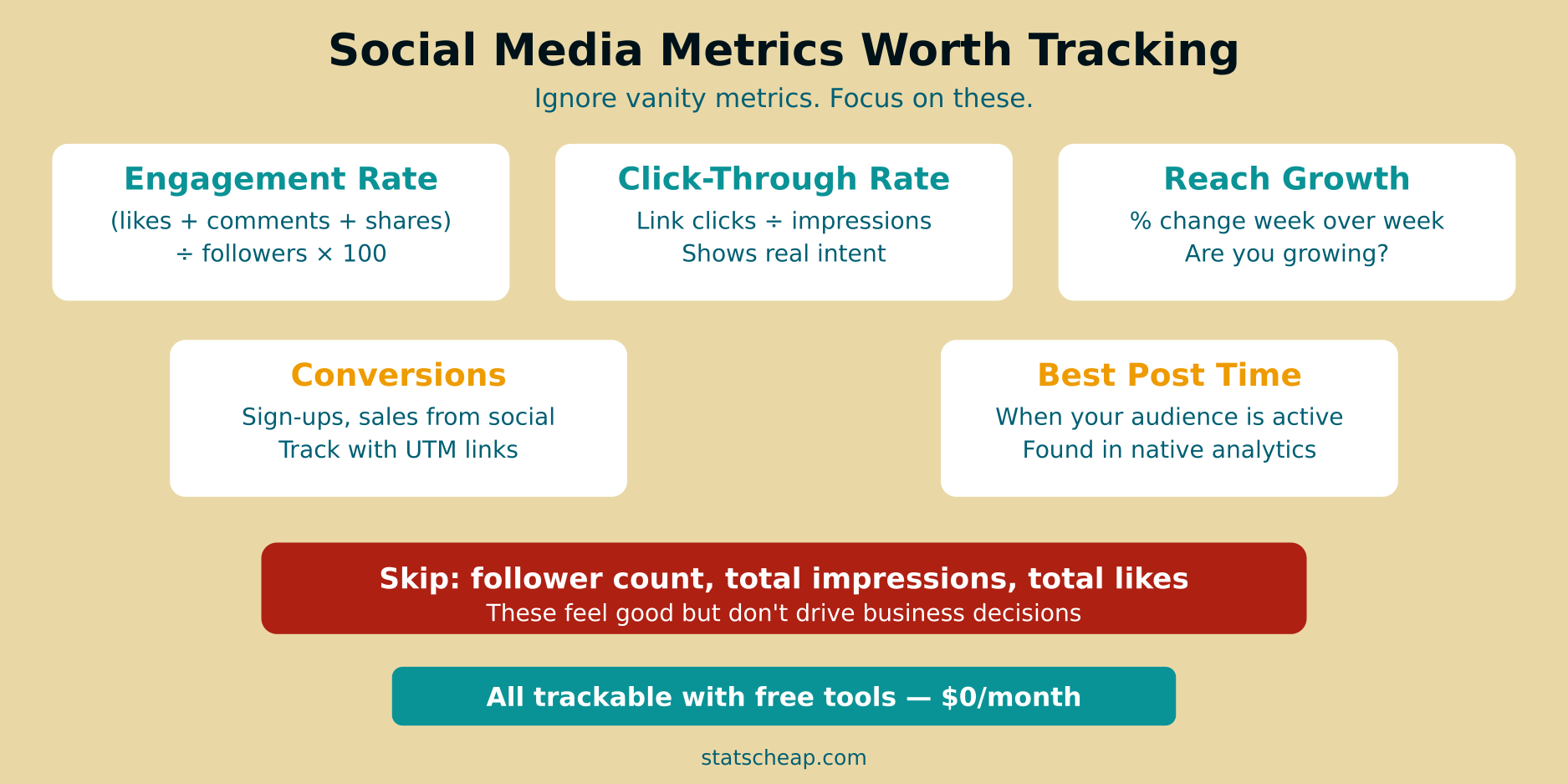
Social Media Metrics Worth Tracking (and Vanity Metrics to Skip)
Having free tools means nothing if you’re tracking the wrong metrics. Here’s what actually matters for your business — and what to ignore.
Metrics That Matter
- Engagement Rate: (Likes + Comments + Shares + Saves) ÷ Reach. This tells you whether your content resonates. Aim for 1-3% on Instagram, 0.5-1% on Facebook.
- Click-Through Rate (CTR): Clicks ÷ Impressions. The only metric that directly measures whether people took action. Furthermore, CTR connects your social effort to website traffic.
- Reach Growth Rate: How quickly you’re expanding your audience — more useful than raw follower counts.
- Conversions from Social: Sign-ups, purchases, or leads attributed to social media. Track this with UTM parameters for accurate attribution.
- Best Posting Time: When your specific audience is active. Every platform’s analytics shows this — use it.
Vanity Metrics to Skip
- Raw Follower Count: 10,000 unengaged followers are worth less than 500 engaged ones. Stop chasing this number.
- Total Impressions: High impressions with low engagement means your content is being shown but ignored. Focus on engagement rate instead.
- Likes Alone: Likes are the lowest-effort interaction. Comments, shares, and saves indicate much stronger engagement.
Tracking Social Media Conversions with UTM Parameters
Free social media analytics tools show you what happens on the platform. However, to track what happens after someone clicks through to your website, you need UTM parameters. These are tags added to your URLs that tell Google Analytics exactly where your traffic came from.
For example, instead of sharing yoursite.com/sale, share yoursite.com/sale?utm_source=instagram&utm_medium=social&utm_campaign=spring_sale. Then in GA4, you can see exactly how many conversions came from that specific Instagram post. Read our complete UTM parameters guide for step-by-step setup.
This is the missing link for most small businesses. They track engagement on social platforms but have no idea which posts actually drive revenue. UTM tracking solves that — for free.
Building a Free Cross-Platform Social Media Dashboard
The biggest problem with free social media analytics tools is data fragmentation. Your Instagram data lives in Meta Business Suite, your Twitter data is in Twitter Analytics, and your LinkedIn data is on LinkedIn. As a result, you never get a complete picture.
The solution is Google Looker Studio. Here’s how to build a unified dashboard:
- Export weekly data from each platform as CSV (most free plans allow this)
- Upload to Google Sheets with a consistent format: Date, Platform, Posts, Reach, Engagement, Clicks
- Connect Google Sheets to Looker Studio as a data source
- Build comparison charts showing cross-platform performance
- Add Google Analytics data to see social traffic and conversions alongside platform metrics
This takes about 30 minutes to set up the first time. After that, updating weekly takes 10 minutes of data entry. It’s not fully automated like a $99/month tool, but it gives you the same strategic overview — for $0.
Free vs Paid Social Media Analytics: What You Actually Miss
| Feature | Free Tools | Paid (Hootsuite/Sprout) |
|---|---|---|
| Post scheduling | Limited (Buffer: 10/channel) | Unlimited |
| Cross-platform dashboard | Manual (Looker Studio) | Automatic |
| Competitive analysis | Basic (Rival IQ free) | Deep competitor tracking |
| Sentiment analysis | Not available free | AI-powered sentiment |
| Team collaboration | Limited | Approval workflows, roles |
| Custom reporting | DIY in Looker Studio | Drag-and-drop reports |
| Monthly cost | $0 | $99–$399 |
The honest truth? Paid tools are more convenient. They automate what free tools require you to do manually. However, the data itself is largely the same. If you have more time than money — which describes most small businesses — the free stack works.
Frequently Asked Questions
Do I need a social media management tool?
Not necessarily. If you manage 1-3 social accounts and post a few times per week, the built-in schedulers and analytics on each platform are sufficient. A management tool becomes valuable when you’re handling 5+ accounts, need team collaboration, or want automated cross-platform reporting. For analytics alone, the free tools listed above cover what matters.
Can I track ROI from social media for free?
Yes — with UTM parameters. Tag every link you share on social media with UTM codes, then track conversions in Google Analytics (GA4). This gives you a clear path from social post → website visit → conversion. See our UTM parameters guide for exact setup instructions. Combine this with your weekly analytics report for a complete picture.
How often should I check social media analytics?
Weekly is the sweet spot for most small businesses. Daily checking leads to reactive decisions based on normal fluctuations. Monthly is too infrequent to catch trends. Therefore, set aside 15-20 minutes each week to review engagement rates, top-performing content, and click-through data. Use Microsoft Clarity to see what social visitors do after they land on your site.
The Bottom Line: Free Social Media Analytics That Work
You can build a comprehensive social media analytics setup for $0. Here’s your action plan:
- Set up Meta Business Suite for Facebook and Instagram analytics ($0)
- Activate TikTok and LinkedIn analytics with Business/Creator accounts ($0)
- Create a Buffer free account for cross-platform scheduling and basic analytics ($0)
- Tag all shared links with UTM parameters for conversion tracking ($0)
- Build a Looker Studio dashboard for your unified cross-platform view ($0)
- Check Rival IQ benchmarks quarterly to see how you compare ($0)
Eight tools, zero dollars, and a clear system. That’s free social media analytics that actually helps you make better decisions. Save your money for what actually matters — creating great content.