


Your website just went down. You don’t know it yet — but your visitors do. They’re bouncing, your revenue is stalling, and Google is noting the outage. Meanwhile, you’re paying $15/month for Pingdom or $23/month for Datadog to tell you about problems like this. Here’s the thing: free uptime monitoring tools do exactly the same job for $0/month. I’ve tested six of them extensively, and they’ll catch downtime just as fast as anything you’re paying for.
Whether you run a single WordPress blog or manage a dozen client sites, uptime monitoring is non-negotiable. Furthermore, every tool on this list includes free alerting via email, and most offer SMS, Slack, or webhook notifications too. Let me walk you through the best options so you can stop overpaying for peace of mind.
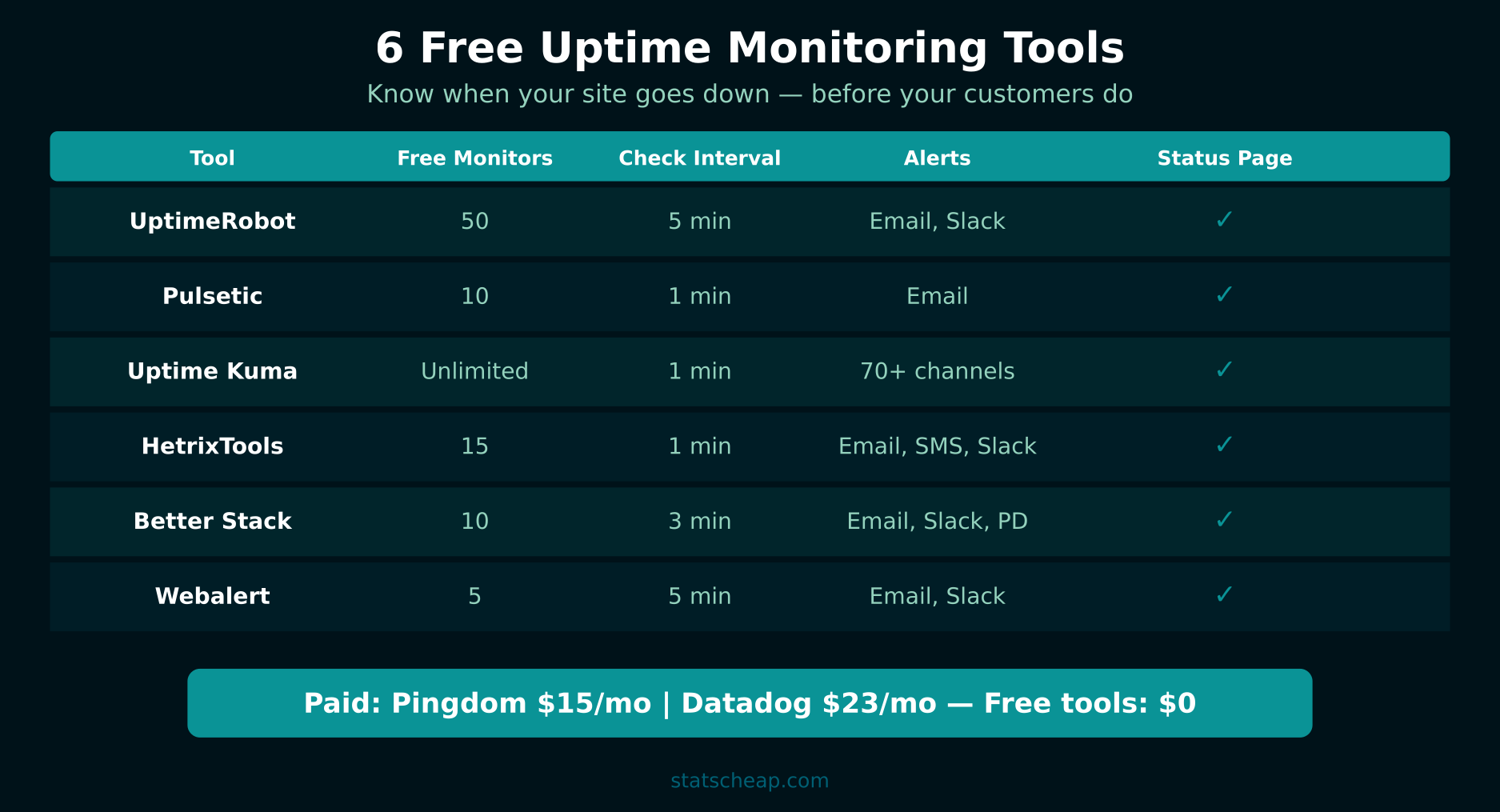
6 Free Uptime Monitoring Tools That Actually Work
I’ve tested each of these tools on real production sites over the past year. Here’s what stood out — and where each one shines.
1. UptimeRobot — The Industry Standard for Free Monitoring
Free tier: 50 monitors, 5-minute check intervals
Alert channels: Email, SMS (limited), Slack, Telegram, webhooks
Status pages: Yes (1 free public status page)
UptimeRobot is the go-to choice for most people, and for good reason. Fifty free monitors is incredibly generous — that’s enough for a small agency’s entire client roster. Checks run every 5 minutes, which means you’ll know about an outage within 5 minutes of it happening. Additionally, the free status page lets you create a professional public dashboard showing your service uptime, which is perfect for client-facing transparency.
The main limitation is the 5-minute interval. If a 3-minute blip matters to your business, you’ll want a faster option. However, for most small sites, 5-minute checks catch everything that matters.
2. Pulsetic — Fast Checks with a Beautiful Interface
Free tier: 10 monitors, 1-minute check intervals
Alert channels: Email, Slack, Microsoft Teams, Discord
Status pages: Yes (customizable, branded)
Pulsetic trades quantity for speed. You only get 10 monitors on the free plan, but checks run every 60 seconds — five times faster than UptimeRobot. Furthermore, the status pages are gorgeous and fully customizable with your own branding. If you manage a smaller number of critical sites and need fast detection, Pulsetic is the better choice. The dashboard is also more modern and intuitive than most competitors.
3. Uptime Kuma — Self-Hosted, Unlimited, Open Source
Free tier: Unlimited monitors, custom intervals (down to 20 seconds)
Alert channels: 90+ notification services (Email, Slack, Discord, Telegram, Pushover, and more)
Status pages: Yes (unlimited, self-hosted)
Uptime Kuma is the power user’s dream. It’s a free, open-source monitoring tool you host yourself — on a VPS, a Raspberry Pi, or even a Docker container on your existing server. Because it’s self-hosted, there are no limits on monitors, check intervals, or status pages. You can check every 20 seconds if you want. In addition, it supports over 90 notification services, so you can alert via practically anything.
The trade-off? You need to maintain the server running Uptime Kuma itself. If that server goes down, your monitoring goes with it. Therefore, I recommend hosting it on a separate provider from your main sites. A $5/month VPS from Hetzner or DigitalOcean gives you unlimited monitoring forever — still cheaper than any paid monitoring service.

4. HetrixTools — SSL Monitoring Included Free
Free tier: 15 monitors, 1-minute check intervals
Alert channels: Email, Slack, Telegram, webhooks, PagerDuty
Status pages: Yes (1 free status page)
HetrixTools stands out because the free plan includes SSL certificate monitoring. You’ll get alerted when your SSL certificate is approaching expiration — a common cause of unexpected downtime. Furthermore, with 15 monitors and 1-minute intervals, it hits a sweet spot between UptimeRobot’s quantity and Pulsetic’s speed. The monitoring runs from 12+ global locations, so you’ll catch regional outages too.
5. Better Stack (formerly Better Uptime) — Incident Management Built In
Free tier: 10 monitors, 3-minute check intervals
Alert channels: Email, SMS, Slack, Microsoft Teams, phone calls
Status pages: Yes (branded, with incident history)
Better Stack goes beyond simple ping monitoring. The free plan includes basic incident management — when a site goes down, it creates an incident, tracks the timeline, and records the resolution. This is valuable if you need to report uptime SLAs to clients or stakeholders. Consequently, you get monitoring plus accountability in one free tool. The status pages also include incident history, so visitors can see past outages and resolutions.
6. Webalert — Lightweight with SSL Monitoring
Free tier: 5 monitors, 5-minute check intervals
Alert channels: Email, Slack
Status pages: No
Webalert is the simplest option on this list. Five monitors with 5-minute checks and email/Slack alerts — nothing more, nothing less. However, it includes SSL certificate monitoring, which makes it useful as a secondary tool alongside UptimeRobot. If you just need basic uptime checks for a personal site or small project, Webalert’s simplicity is actually a feature, not a limitation.
Free Uptime Monitoring Tools Compared
| Tool | Free Monitors | Check Interval | Status Page | SSL Monitoring | Best For |
|---|---|---|---|---|---|
| UptimeRobot | 50 | 5 min | Yes (1) | No | Most sites |
| Pulsetic | 10 | 1 min | Yes | No | Fast detection |
| Uptime Kuma | Unlimited | 20 sec+ | Yes | Yes | Power users |
| HetrixTools | 15 | 1 min | Yes (1) | Yes | SSL + uptime |
| Better Stack | 10 | 3 min | Yes | No | Incident mgmt |
| Webalert | 5 | 5 min | No | Yes | Simple needs |

When to Use Self-Hosted vs Cloud-Based Monitoring
This is the biggest decision you’ll make: do you host your own monitoring with Uptime Kuma, or use a cloud service like UptimeRobot?
Choose cloud-based (UptimeRobot, Pulsetic, HetrixTools) if you want zero maintenance, don’t need more than 50 monitors, and prefer simplicity. Cloud services run on someone else’s infrastructure, so they’re monitoring your sites from an independent location. If your server goes down, the monitoring still works. Furthermore, setup takes under 2 minutes — just enter a URL and configure alerts.
Choose self-hosted (Uptime Kuma) if you need unlimited monitors, want sub-minute check intervals, or require complete data ownership. Uptime Kuma gives you full control, but you’re responsible for keeping it running. Additionally, hosting it on the same server as your websites defeats the purpose — if that server crashes, both your sites and your monitoring go offline together.
My recommendation? Start with UptimeRobot for its generous free tier and simplicity. If you outgrow it or need more control, add Uptime Kuma on a separate VPS. Many professionals use both — UptimeRobot for quick setup and Uptime Kuma for detailed monitoring.
Setting Up Free Status Pages for Clients
Most of these tools include free status pages — public dashboards showing your services’ uptime. This is incredibly valuable for agencies and freelancers. Instead of clients asking “is the site down?” they can check the status page themselves. Here’s how to set one up:
- Pick your tool: UptimeRobot, Pulsetic, or Better Stack all offer free status pages.
- Add your monitors: Include every site or service the client cares about.
- Customize the page: Add your logo, brand colors, and a custom domain (some tools support this on free plans).
- Share the URL: Give clients the status page link. Some tools let you embed it on your own website.
- Configure incident updates: When something goes down, post updates to the status page so clients stay informed.
A professional status page builds trust with clients and reduces support requests. Furthermore, it demonstrates that you take uptime seriously — which justifies your hosting or maintenance fees. All of this costs $0.
SSL Certificate Monitoring: Don’t Let Expired Certs Take You Down
An expired SSL certificate is one of the most embarrassing causes of downtime. Your site shows a scary “Not Secure” warning, browsers block access, and visitors flee. The fix takes 5 minutes, but the damage to trust takes weeks to repair. Therefore, monitoring your SSL expiration is just as important as monitoring uptime.
HetrixTools and Webalert include SSL monitoring on their free plans. Uptime Kuma also monitors SSL certificates if you self-host. These tools alert you days or weeks before your certificate expires, giving you time to renew. If you use Let’s Encrypt with auto-renewal, SSL monitoring acts as a safety net — because auto-renewal can fail silently.
For a complete picture of your site’s health, combine uptime monitoring with speed testing using free SEO monitoring tools and performance data from your analytics reports.
Frequently Asked Questions
How often should uptime be checked?
Every 5 minutes is sufficient for most websites. If you run an e-commerce store or SaaS product where every minute of downtime costs money, check every 1-3 minutes. For personal blogs or portfolio sites, even 10-minute intervals are fine. The key is that you’re monitoring at all — most small sites have zero monitoring, which means outages go unnoticed for hours.
What’s acceptable uptime?
The industry standard is 99.9% uptime, which allows about 8.7 hours of downtime per year. Most shared hosting providers guarantee 99.9%. Premium hosts aim for 99.99% (52 minutes of downtime per year). However, for small business websites, 99.5% uptime (about 1.8 days per year) is common and usually acceptable. Track your actual uptime with these free tools and hold your hosting provider accountable to their SLA.
Do I need uptime monitoring for a small site?
Yes. Even if your site gets 100 visitors a day, you want to know when it’s down. First, downtime affects your search rankings — Google notices when your site is unreachable. Second, if a potential customer visits during an outage, you’ve lost that lead forever. Third, free uptime monitoring takes 2 minutes to set up and costs nothing. There’s simply no reason not to do it.
Your Free Uptime Monitoring Action Plan
Stop paying for monitoring you can get for free. Here’s your setup checklist:
- Sign up for UptimeRobot and add your sites (up to 50). This takes 5 minutes and covers most needs. ($0)
- Enable email and Slack alerts so you’re notified immediately when something goes down. ($0)
- Create a status page for client-facing sites to build trust and reduce support questions. ($0)
- Add SSL monitoring via HetrixTools to catch expiring certificates before they cause problems. ($0)
- For power users: Install Uptime Kuma on a separate VPS for unlimited monitors and sub-minute checks. ($5/month for the VPS)
Total cost for most sites: $0/month. You’ll catch downtime within 5 minutes, get instant alerts, and have a professional status page — all without spending a cent. That’s free uptime monitoring done right, and it’s everything most small businesses need.