


Let me start with a number that might sting: small businesses spend an average of $200-500 per month on analytics tools they barely use. That’s $2,400-6,000 per year on dashboards they check once a week, features they’ve never clicked, and data they don’t act on. I’ve audited dozens of small business analytics stacks, and the pattern is always the same — they’re paying for enterprise-grade tools when free vs paid analytics isn’t even a close contest at their scale. The free tools win, and it’s not even close.
This isn’t an anti-paid-tools argument. Paid analytics tools exist for good reasons, and some businesses genuinely need them. However, most small sites — especially those under 10,000 monthly visitors — can build a complete analytics stack for $0/month that covers 90% of what they need. This guide will help you decide whether you actually need paid tools, or whether you’re just paying for peace of mind that free tools deliver equally well.
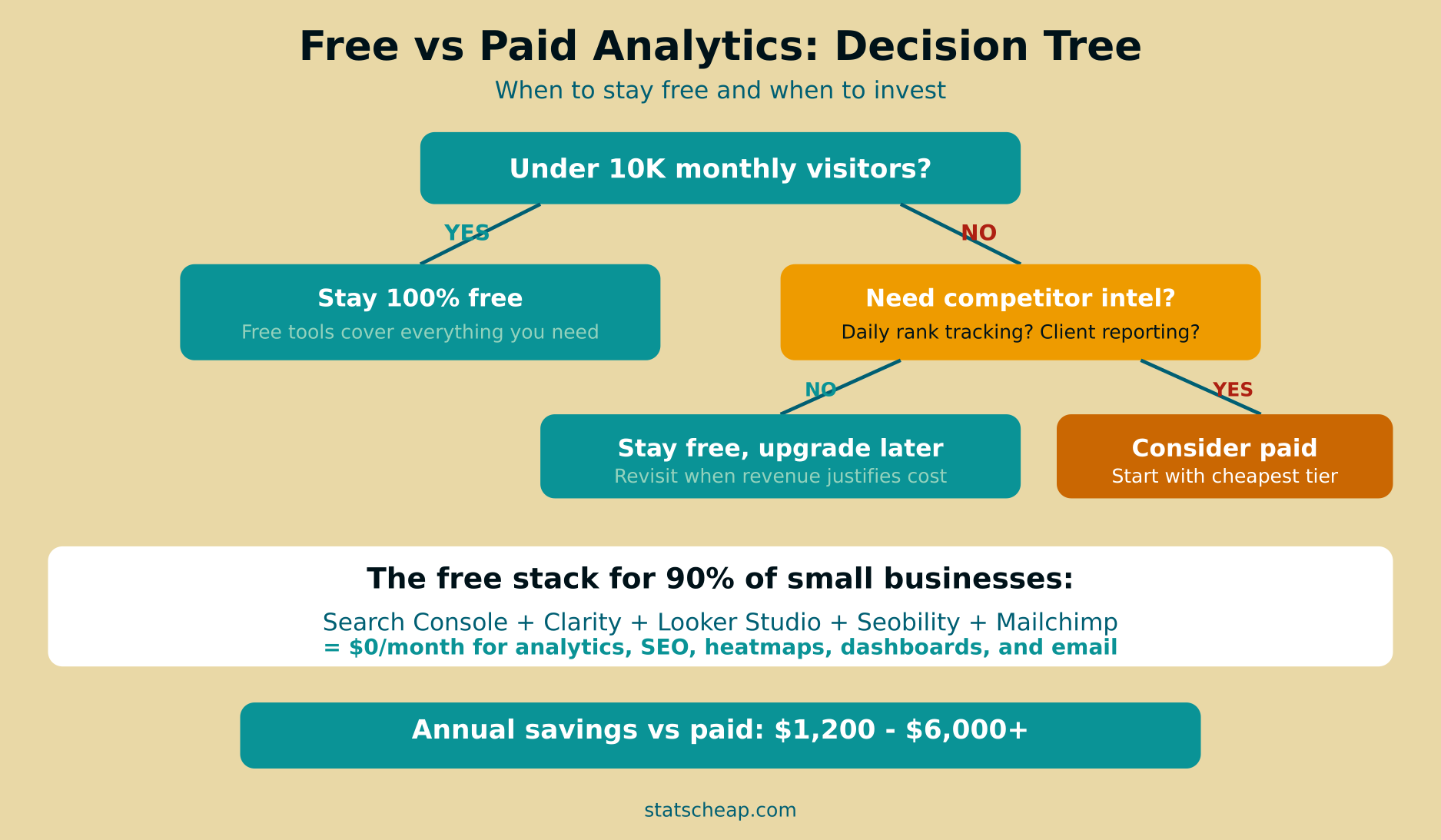
The Complete Free Analytics Stack: Everything for $0/Month
Before discussing when to pay, let’s establish what free tools can actually do. This is the stack I recommend to every small business, and it covers analytics, SEO, user behavior, reporting, email, and monitoring:
| Need | Free Tool | Paid Alternative | Annual Savings |
|---|---|---|---|
| Web Analytics | GA4 (Google Analytics) | Adobe Analytics ($2,000+/mo) | $24,000+ |
| User Behavior | Microsoft Clarity | Hotjar ($39/mo) | $468 |
| SEO Monitoring | Google Search Console + Seobility Free | SEMrush ($129/mo) | $1,548 |
| Dashboards | Google Looker Studio | Tableau ($70/user/mo) | $840 |
| Campaign Tracking | UTM Parameters + GA4 | HubSpot Marketing ($800/mo) | $9,600 |
| Email Analytics | Mailchimp Free / MailerLite Free | Klaviyo ($45/mo) | $540 |
| Uptime Monitoring | UptimeRobot Free | Pingdom ($15/mo) | $180 |
| Speed Testing | PageSpeed Insights + GTmetrix | DebugBear Pro ($39/mo) | $468 |
| Social Analytics | Built-in platform analytics | Sprout Social ($249/mo) | $2,988 |
| Competitor Intel | SimilarWeb + SpyFu Free | Ahrefs ($139/mo) | $1,668 |
| A/B Testing | Google Optimize alternatives | Optimizely ($79/mo) | $948 |
| E-commerce | GA4 Enhanced E-commerce | Mixpanel ($25/mo) | $300 |
| Total | $0/month | $43,548+/year |
That table isn’t theoretical. Every free tool listed is fully functional and widely used by businesses of all sizes. The paid alternatives are real prices from their websites as of 2026. Obviously, no small business uses all of those paid tools — but even replacing 3-4 paid subscriptions with free alternatives saves $1,200-6,000+ per year.
I’ve written detailed guides for every tool in that stack (linked in the table above). Together, they form a complete free analytics stack that rivals what many businesses pay thousands for. The real question isn’t whether free tools are capable — it’s whether your specific situation requires something more.

The Decision Tree: When Free Is Enough vs When to Consider Paid
Not every business should stay on free tools forever. Here’s a practical decision framework based on real-world scenarios I’ve encountered:
Free Tools Are Enough When:
- Your site gets under 10,000 monthly visitors. At this scale, GA4 + Clarity handles everything without hitting any limits.
- You manage a single website. Free tools work brilliantly for one site. The complexity comes with multiple sites.
- You check analytics weekly or monthly — not daily. If you don’t need real-time data or automated daily reports, free is perfect.
- Your SEO tracking needs are modest. Google Search Console covers most keyword tracking. Free rank tracking tools like Seobility cover the rest.
- You’re a solopreneur or small team where one person manages marketing. Free tools don’t require team collaboration features.
- Your budget is better spent on content, ads, or product — analytics tools don’t generate revenue directly.
Consider Paid Tools When:
- You need daily automated rank tracking at scale — tracking 50+ keywords daily across multiple competitors. Free tools check weekly at best.
- You’re an agency managing 10+ client sites. Free tools don’t offer white-label reporting or multi-client dashboards efficiently.
- Deep competitor backlink analysis is critical — free tools show surface-level competitor data. Ahrefs and SEMrush reveal link-building opportunities.
- You need historical data going back years. Most free tools keep 16-18 months of data. Paid tools retain years of history.
- You require automated alerting for specific metrics. Free tools alert on downtime, but paid tools alert on traffic drops, ranking changes, and conversion anomalies.
- Compliance requires specific data handling — HIPAA, SOC 2, or other regulations may require enterprise analytics platforms.
What Free Tools Can’t Do Well (Honest Assessment)
I’m a budget analytics advocate, but I’m also honest. Here’s where free tools genuinely fall short:
- Daily automated rank tracking at scale: Google Search Console shows average positions but doesn’t track daily changes for specific keywords. Free rank trackers like Seobility check weekly, not daily. If daily ranking data drives your SEO decisions, you need a paid tool.
- Deep competitor backlink analysis: Free competitor tools show traffic estimates and keywords, but detailed backlink profiles require Ahrefs or Moz. If link building is your primary SEO strategy, this data is worth paying for.
- Historical data beyond 16 months: GA4 retains 14 months of event data. Search Console keeps 16 months. If you need year-over-year comparisons going back 3-5 years, you’ll need to export data regularly or use a paid tool that stores history.
- Multi-client white-label reporting: Looker Studio makes great reports, but white-labeling and automated client delivery requires manual work or a paid reporting tool.
- Advanced attribution modeling: GA4’s attribution is good but limited. Paid tools like Triple Whale or Northbeam offer sophisticated multi-touch attribution for e-commerce.
Notice that most of these limitations only matter at scale or for specialized use cases. A local bakery, a freelance designer, or a small e-commerce store with 5,000 monthly visitors doesn’t need any of these capabilities. The true cost of “free” analytics is your time learning the tools — not the money.

The ROI Test: Is Your Paid Tool Worth It?
Here’s the simplest test for whether a paid analytics tool is justified: does it save you 2 or more hours per month? If your time is worth $50/hour (a reasonable rate for a business owner) and a $99/month tool saves you 2+ hours monthly, it’s worth it. If it saves you 30 minutes? You’re overpaying.
Apply this test to every paid tool in your stack:
- SEMrush ($129/month): Do you use it for 3+ hours of work per month? Or do you check rankings once and ignore the other 50 features?
- Hotjar ($39/month): Microsoft Clarity does heatmaps and session recordings for free. Does Hotjar’s survey feature alone justify $468/year? (Read the full Clarity vs Hotjar comparison.)
- Sprout Social ($249/month): Are you using the enterprise collaboration features, or just scheduling posts? Buffer’s free plan might be enough.
Be brutally honest. Most businesses use less than 20% of their paid tools’ features. That means 80% of the subscription cost is waste. Furthermore, the sunk cost fallacy keeps people subscribed — “I’m paying for it, so I should keep using it” — even when free alternatives cover their actual needs.
The “Just Enough” Budget Setup: $20-50/Month
If free tools aren’t quite enough but enterprise pricing is absurd, there’s a middle ground. Here’s what I call the “just enough” budget analytics setup:
| Tool | Cost | What It Adds Over Free |
|---|---|---|
| Seobility Premium | $50/month | 3 projects, daily rank tracking, deeper site audits |
| Plausible Analytics | $9/month | Privacy-first analytics, simpler than GA4, no cookie banners needed |
| Mailchimp Essentials | $13/month | More contacts (500→50,000), remove branding, A/B testing |
You don’t need all three. Pick the one that addresses your biggest limitation:
- Need better SEO tracking? Seobility Premium at $50/month covers daily rank tracking for 3 projects — that’s $79/month cheaper than SEMrush.
- Frustrated with GA4’s complexity? Plausible at $9/month gives you clean, simple analytics without the learning curve or cookie consent requirements.
- Outgrowing email free tiers? Mailchimp Essentials at $13/month handles up to 50,000 contacts with better analytics and no branding.
This “just enough” approach costs $9-50/month instead of $200-500/month, and it fills the gaps that free tools leave. For most small businesses between 5,000-50,000 monthly visitors, this is the sweet spot.
Red Flags You’re Overpaying for Analytics
Watch for these warning signs that your paid tools aren’t worth their cost:
- You use less than 20% of the features. If you’re paying for SEMrush but only checking rankings, you’re subsidizing features you don’t use.
- You check data monthly, not weekly. Paid tools are designed for daily or weekly power users. If you’re a monthly checker, free tools cover you completely.
- Only one person uses the tool. Enterprise pricing assumes team collaboration. A solo marketer rarely needs team features.
- You can’t name 3 decisions the tool helped you make last month. Data without decisions is just expensive decoration.
- You subscribed “just in case” or for a one-time project. Cancel and re-subscribe when you actually need it. Most tools don’t penalize re-subscription.
- The free version of the same tool exists. Many paid tools (Hotjar, SEMrush, Ahrefs) have free tiers or free alternatives that cover basic needs.
I’ve seen businesses cut $300/month in analytics subscriptions after this audit and notice zero impact on their marketing effectiveness. The data they actually used was available for free the entire time. Run your own analytics tools through the e-commerce analytics and A/B testing guides to find free replacements.
Cost Comparison: Free vs Budget vs Enterprise
| Category | Free Stack ($0/mo) | Budget Stack ($50/mo) | Enterprise Stack ($500+/mo) |
|---|---|---|---|
| Web Analytics | GA4 | GA4 + Plausible | Adobe Analytics |
| SEO | Search Console + Seobility Free | Seobility Premium | SEMrush / Ahrefs |
| User Behavior | Microsoft Clarity | Microsoft Clarity | Hotjar Business |
| Dashboards | Looker Studio | Looker Studio | Tableau / Power BI |
| Mailchimp Free | Mailchimp Essentials | Klaviyo / HubSpot | |
| Monitoring | UptimeRobot | UptimeRobot + Uptime Kuma | Datadog |
| A/B Testing | Free tools | Free tools | Optimizely |
| Monthly Cost | $0 | $50 | $500-2,000+ |
| Annual Cost | $0 | $600 | $6,000-24,000+ |
The free stack covers 90% of what small businesses need. The budget stack covers 95%. The enterprise stack covers 100% — but costs 10-50x more. The question isn’t which stack is “better” — they’re all good at their price point. The question is which one matches your actual needs, not your aspirational ones.
Frequently Asked Questions
Should a brand new website pay for analytics?
Absolutely not. A new website has minimal traffic, no historical data to analyze, and no established patterns to optimize. Start with the complete free stack — GA4, Search Console, Clarity, Looker Studio. These tools handle everything a new site needs. Furthermore, you’ll learn analytics fundamentals without the pressure of justifying a monthly subscription. Once you hit 10,000+ monthly visitors and have 6+ months of data, revisit whether paid tools would add value.
What’s the first paid tool worth buying?
For most small businesses, it’s Seobility Premium at $50/month or a similar SEO tool. Why? Because SEO drives sustainable organic traffic, and daily rank tracking helps you measure what’s working. GA4 is already free for web analytics, Clarity is free for user behavior, and Looker Studio is free for dashboards. SEO monitoring is the one area where free tools have the biggest gap — Search Console is great but doesn’t track specific keyword rankings daily. Use insights from AI-powered analytics with ChatGPT to get even more value from your data before upgrading.
How do I convince my boss that free tools are enough?
Show the ROI math. Calculate what you’re spending on paid tools annually. Then demonstrate that free alternatives produce the same reports and insights. Build a sample dashboard in Looker Studio using free data sources and present it alongside the paid tool’s output. If the outputs are comparable, the cost difference speaks for itself. Additionally, frame it as reallocation — the $1,200-6,000 saved could fund content creation, advertising, or product development that actually drives growth.
Your Free vs Paid Analytics Decision: The Annual Savings
Let’s make this concrete. If you’re currently paying for analytics tools, here’s what switching to free alternatives saves:
- Replace Hotjar with Clarity: Save $468/year
- Replace SEMrush with Search Console + Seobility Free: Save $1,548/year
- Replace Sprout Social with native analytics: Save $2,988/year
- Replace Pingdom with UptimeRobot: Save $180/year
- Replace paid reporting with Looker Studio: Save $840/year
Typical small business savings: $1,200-6,000+ per year. That’s a marketing budget, a contractor’s retainer, or a year of premium hosting — redirected from tools you barely used to investments that drive growth.
Here’s your action plan:
- Audit your current analytics spend. List every paid tool, its monthly cost, and honestly rate how much you use it (1-10). ($0)
- Set up the free stack. GA4, Search Console, Clarity, Looker Studio, UptimeRobot. ($0)
- Run both stacks in parallel for one month. Compare the insights you get from free vs paid. ($0)
- Cancel any paid tool where the free alternative produces comparable output. Be honest — “comparable” means it serves your actual decision-making needs. (Save $50-500/month)
- Redirect the savings into content, advertising, or product development that generates revenue. (Priceless)
The free vs paid analytics debate has a clear winner for most small businesses: free tools are not just “good enough” — they’re genuinely excellent. The analytics industry has matured to a point where world-class tools are available at no cost. Your job isn’t to find the most expensive tool — it’s to find the right tool. And more often than not, the right tool is free.