


If you’ve ever spent money on a Facebook ad, an email campaign, or a guest post — and then opened your analytics dashboard only to see all that traffic lumped under “direct” or “referral” — you know the frustration. You know that campaign drove results. But you can’t prove it. That’s exactly the problem UTM parameters solve. And here’s the best part: this utm parameters guide will show you how to set them up for exactly $0/month.
UTM tracking is one of the most underused free tools in digital marketing. It takes five minutes to learn, costs nothing, and gives you crystal-clear data about which campaigns, channels, and content actually bring results. Let’s break it down.
What Are UTM Parameters? The Free Tracking Code Explained
UTM stands for “Urchin Tracking Module” — a holdover from Urchin, the software Google acquired and turned into Google Analytics. In practice, UTM parameters are simply short text snippets you add to the end of a URL. When someone clicks that tagged link, your analytics platform reads those snippets and tells you exactly where the visitor came from.
Here’s what a UTM-tagged URL looks like:
https://yoursite.com/sale-page/?utm_source=facebook&utm_medium=cpc&utm_campaign=spring_sale_2026Everything after the ? is the UTM data. Your website visitors don’t notice it. But your analytics platform captures every parameter and sorts the traffic accordingly. No paid tools required. No complex setup. Just tagged URLs.
The 5 UTM Parameters Every Marketer Should Know
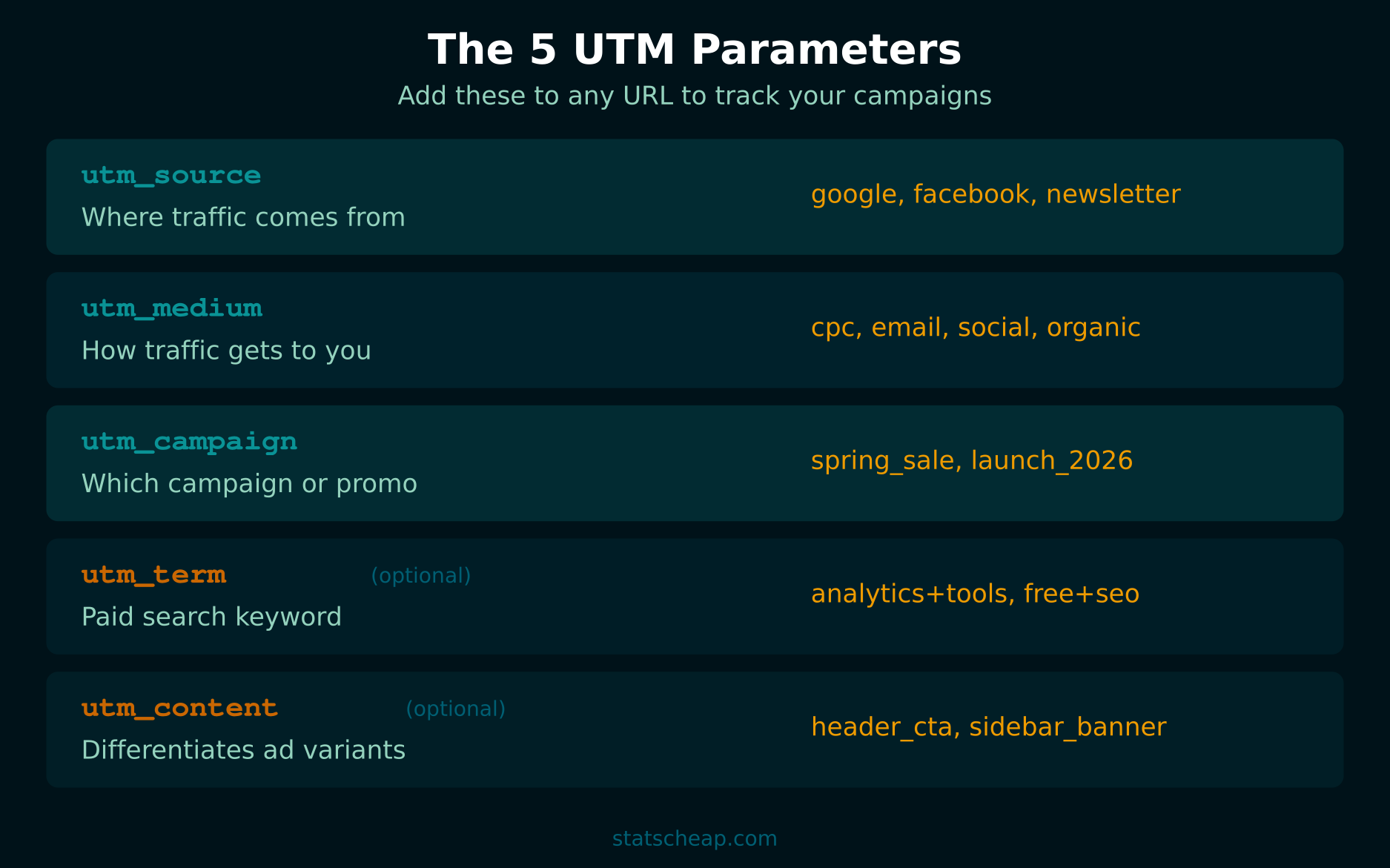
There are exactly five UTM parameters. The first three are required for any tagged link. The last two are optional but powerful for paid campaigns and A/B testing.
utm_source (Required)
What it tracks: Where your traffic originates. This is the platform or website sending visitors your way.
Examples: google, facebook, newsletter, twitter, partner_blog
utm_medium (Required)
What it tracks: The marketing channel or type of traffic. Think of it as how the visitor reaches you.
Examples: cpc (cost-per-click ads), email, social, organic, referral, display
utm_campaign (Required)
What it tracks: The specific promotion, product launch, or initiative. This is where you name your campaign.
Examples: spring_sale_2026, product_launch, weekly_digest, black_friday
utm_term (Optional)
What it tracks: The paid search keyword that triggered your ad. Most useful for Google Ads campaigns.
Examples: free+analytics+tools, budget+marketing
utm_content (Optional)
What it tracks: Which specific link or creative a visitor clicked. Perfect for A/B testing different call-to-action buttons, ad variations, or link placements.
Examples: header_cta, sidebar_banner, blue_button, text_link_v2
How to Create UTM-Tagged URLs for Free
You don’t need any paid software. Google provides a free tool called the Campaign URL Builder that does all the work. Here’s how to use it:
- Enter your destination URL — the page you want to send traffic to.
- Fill in the three required fields: source, medium, and campaign name.
- Add optional fields if you’re running paid search or testing variants.
- Copy the generated URL — the tool builds the full tagged link automatically.
- Use it in your ads, emails, social posts, or anywhere you share links.
That’s it. Five steps, zero cost. Every click on that link will now show up in your analytics with the exact source, medium, and campaign you specified.
For teams that create many UTM links, a shared Google Sheet works perfectly as a UTM tracker. Create columns for URL, source, medium, campaign, date, and creator. This prevents duplicate naming and keeps everyone on the same page. Also $0.
UTM Parameters Guide: Naming Convention Best Practices
Here’s the thing — UTM parameters are case-sensitive. That means Facebook, facebook, and FACEBOOK create three separate entries in your reports. This is the number one mistake small businesses make, and it fragments your data into a mess. Follow these rules:
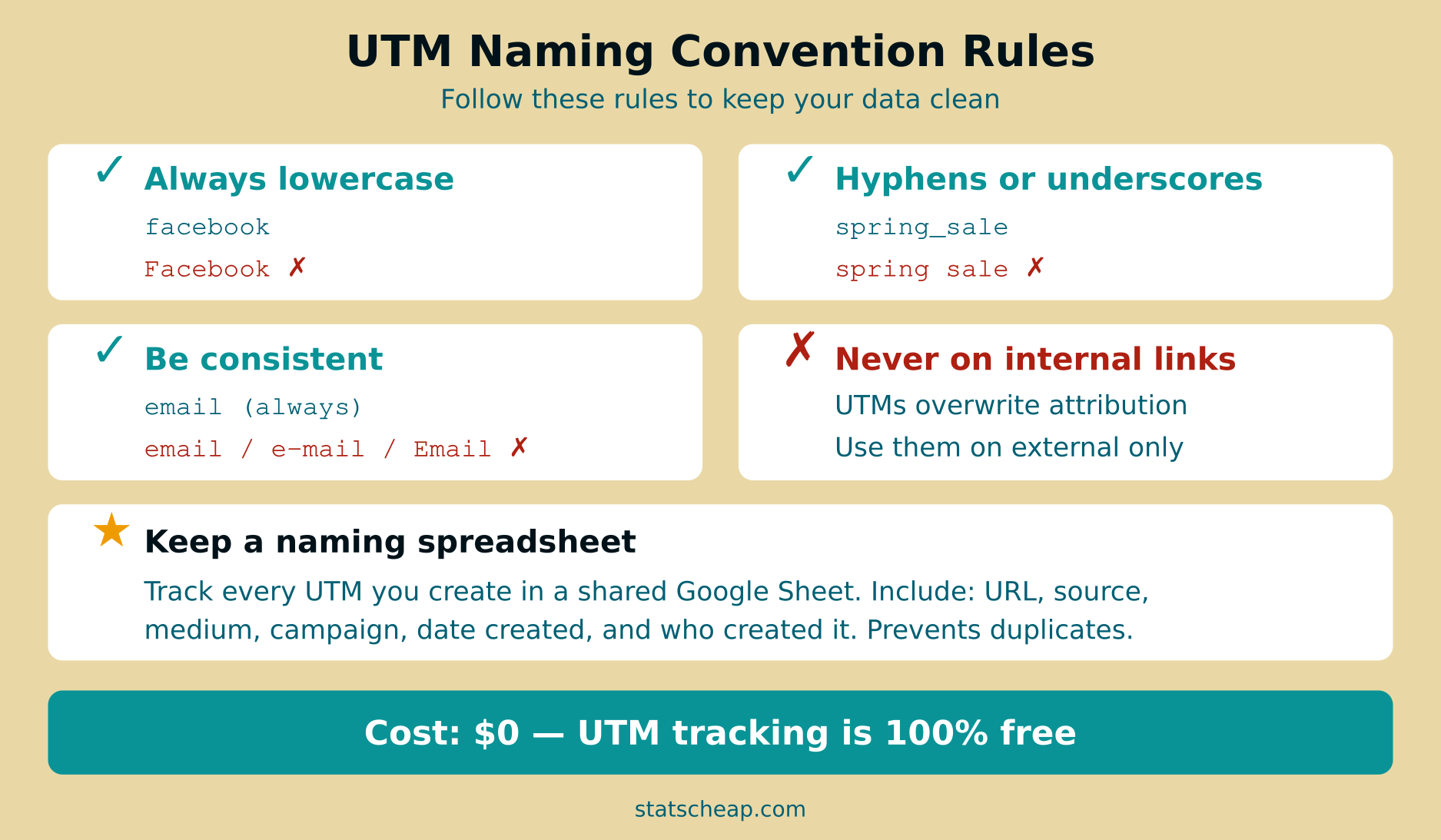
- Always use lowercase. No exceptions.
facebook, notFacebook. - Use underscores or hyphens instead of spaces. Spaces break URLs. Use
spring_saleorspring-sale. - Be consistent. Pick
emailore-mailand stick with it forever. Document your choices. - Keep it short but descriptive.
fbis too vague.facebook_business_page_organic_postis too long.facebookis just right. - Never use UTMs on internal links. Tagging links within your own site overwrites the original attribution data. A visitor who came from Google will suddenly appear as “internal_promo” instead.
- Include dates in campaign names when running recurring promotions:
newsletter_2026_03instead of justnewsletter.
How to Read UTM Data in Your Analytics

Once you start tagging your links, your analytics platform will automatically categorize the incoming traffic. In most tools, you’ll find UTM data under the “Acquisition” or “Traffic Sources” section. Here’s where each parameter shows up:
- utm_source → Source report (shows Google, Facebook, Newsletter, etc.)
- utm_medium → Medium report (shows CPC, Email, Social, etc.)
- utm_campaign → Campaigns report (shows your named campaigns)
- utm_term → Usually found in Paid Keywords or detailed campaign reports
- utm_content → Ad Content or secondary dimension in campaign reports
In Microsoft Clarity (free), you can filter session recordings by UTM parameters — meaning you can watch exactly how visitors from a specific campaign behave on your site. In Plausible ($9/month) and Umami (free, self-hosted), UTM data appears in the referrer section automatically. No additional setup needed.
For a deeper look at free analytics platforms that support UTM tracking, check out our complete guide to free web analytics tools.
Free UTM Tools and Builders Worth Using
You don’t need to spend a dime on UTM management. Here are the best free options:
| Tool | Price | Best For |
|---|---|---|
| Google Campaign URL Builder | Free | Quick one-off UTM links |
| Google Sheets (DIY tracker) | Free | Team UTM documentation |
| UTM.io | Free tier | Organized UTM creation with templates |
| URL shorteners (Bitly, TinyURL) | Free tier | Shortening long UTM URLs for social |
Most small businesses won’t need anything beyond Google’s free builder and a simple spreadsheet. Save your money for what actually matters — the campaigns themselves.
Common UTM Mistakes That Waste Your Data
Even experienced marketers make these errors. Avoid them from the start:
- Inconsistent capitalization.
Emailandemailare different sources in analytics. Pick one, document it, enforce it. - Using UTMs on internal links. This is the most damaging mistake. When a visitor clicks an internal UTM-tagged link, their original source (e.g., Google organic) gets overwritten. You lose real attribution data.
- Forgetting to tag. If only half your emails have UTM tags, you’re only seeing half the picture. Be systematic — tag every external link, every time.
- Making URLs too long. A UTM link with five parameters can get very long. Use a URL shortener for social media posts.
- Not documenting. Without a shared naming doc, your team will inevitably create
fb,facebook, andFacebookas separate sources. Maintain that spreadsheet.
UTM Tracking for Small Business: Practical Examples
Let’s do the math on a real small business scenario. Say you run a local bakery with a website, a monthly newsletter, and social media presence. Here’s how you’d tag your links:
| Channel | UTM Source | UTM Medium | UTM Campaign |
|---|---|---|---|
| Monthly newsletter | mailchimp | email | march_newsletter_2026 |
| Instagram bio link | instagram | social | bio_link |
| Facebook post | facebook | social | spring_menu_launch |
| Google Business listing | google | local | gbp_website_button |
| Partner blog mention | food_blog_name | referral | guest_post_march |
After one month, you open your analytics and instantly see: the newsletter drives 40% of traffic, Instagram drives clicks but no orders, and that guest post on the food blog brought 15 new customers. Now you know where to invest your time next month — all from free UTM tracking.
If you want to see how these analytics sources connect into a bigger picture, read our guide on building a full analytics stack for $0.
Frequently Asked Questions
Do UTM parameters affect SEO?
No. UTM parameters don’t affect your search rankings. Search engines ignore the query string (the part after ?) when indexing pages. However, it’s still good practice to use canonical tags so that search engines know your preferred URL version.
Can I use UTM parameters with any analytics tool?
Yes. UTM parameters work with virtually every analytics platform — including Microsoft Clarity (free), Matomo (free self-hosted), Plausible ($9/month), Umami (free self-hosted), and Fathom ($15/month). They’re an open standard, not a Google-only feature.
How many UTM parameters should I use per link?
Always include the three required ones: source, medium, and campaign. Add term and content only when you need that extra level of detail — typically for paid ads or A/B tests. For most small business links, three parameters are enough.
Is there a free UTM parameters guide template I can download?
You don’t need a paid template. Create a free Google Sheet with these columns: Full URL, utm_source, utm_medium, utm_campaign, utm_term, utm_content, Date Created, Created By, and Notes. That’s your complete UTM tracking system for $0.
Bottom Line: Start Tagging Today
UTM parameters are the simplest, cheapest upgrade you can make to your marketing analytics. They cost nothing, work with every analytics platform, and take minutes to implement. Here’s your action plan:
- Create a UTM naming spreadsheet in Google Sheets (free).
- Bookmark the Google Campaign URL Builder (free).
- Tag every external link you share — emails, social posts, ads, partner mentions.
- Never tag internal links — this is the one rule you must not break.
- Review your campaign data monthly to see what’s actually working.
Budget-friendly doesn’t mean second-rate. With UTM tracking, you get enterprise-level campaign attribution for exactly $0. Smart beats expensive — every time.