Hotjar rebuilt its pricing this year, and the free tier got a lot bigger — 200,000 sessions a month. Read the next line down, though: only 10,000 of those come back as replays you can watch, on a single project, and the paid ladder opens at $49/month. You can get heatmaps, scroll maps and session recordings with no replay ceiling at all for $0/month. Let’s do the math on the best free heatmap tools and rank them by what actually matters — how generous the free tier really is.
This guide covers every free heatmap tool I could find, compared across real small-business sites — a local services site, a niche blog, and a bootstrapped e-commerce store. Most roundups bury the free-tier limits in a footnote. I lead with them, because the headline number on a pricing page and the number that actually limits you are rarely the same — a huge session allowance means little when the replay cap sits an order of magnitude below it. Below, every pick is flagged as free forever or free trial (expires), with the exact caps that bite.
Free Heatmap Tools at a Glance
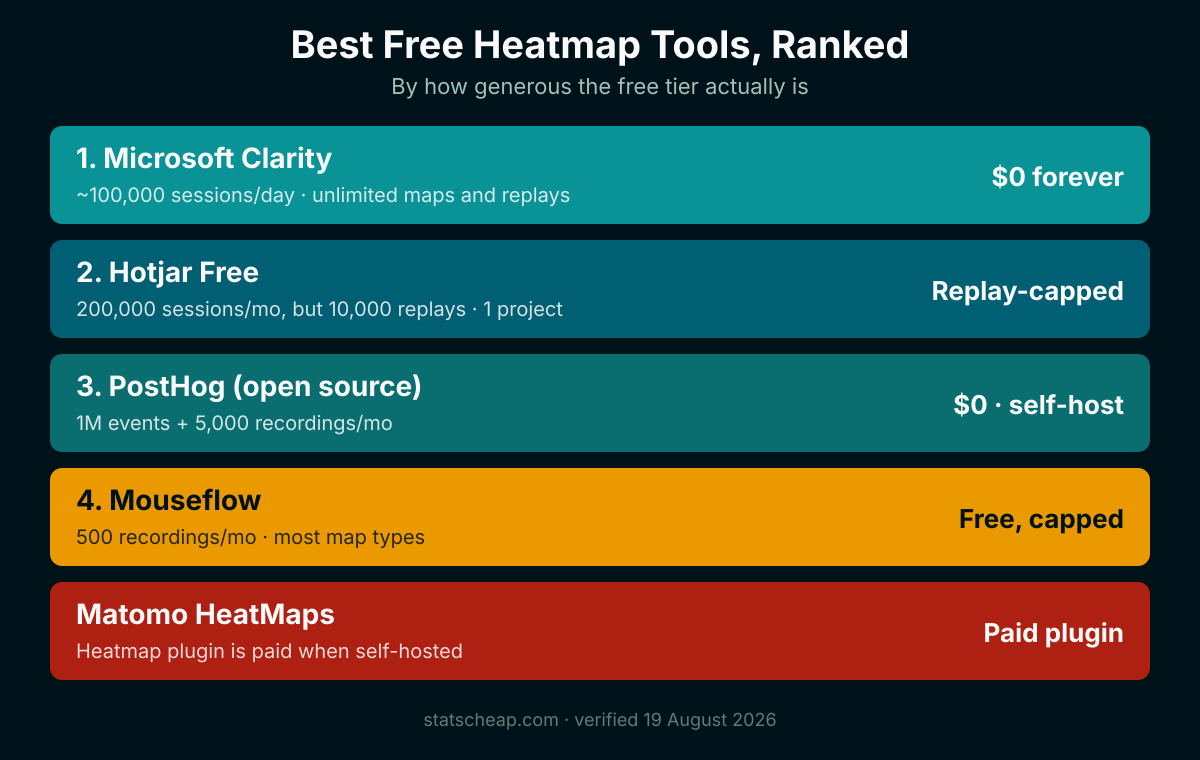
Before the deep dives, here’s the whole field in one view. Notice the gap between the top pick and everything else — that’s not an accident. When one tool is genuinely unlimited and free, the others are competing for second place.
| Tool | Free-Tier Limit | Heatmap Types | Cost After Free | Truly Free? |
|---|---|---|---|---|
| Microsoft Clarity | ~100,000 sessions/day (soft cap) | Click, scroll, area | $0/month — no paid tier | Free forever |
| PostHog | 1M events + 5,000 recordings/mo | Click, scroll, rage, movement | Usage-based after free tier | Free forever (cloud tier) |
| Mouseflow | 500 sessions/mo, 1 site | Click, scroll, movement, attention, geo | From $25/month | Free forever (capped) |
| Hotjar Free | 200,000 sessions/mo, but 10,000 replays, 1 project | Click, scroll, move | From $49/month | Free forever (replay-capped) |
| Matomo HeatMaps | Cloud trial only; self-host plugin is paid | Click, scroll, move | Paid plugin, yearly | Free trial (expires) |
Free-tier limits and pricing re-checked against each vendor’s own pricing page on 19 August 2026. Hotjar’s pricing page now redirects to Contentsquare, where the plans are listed as digital experience analytics; Matomo’s heatmap feature is a paid plugin when you self-host. Always check the official pricing page before you commit — free tiers move, and Hotjar’s moved a long way this year.
Click, Scroll and Move Maps: What Each One Shows
Before you pick a tool, it helps to know what a heatmap is and what the different flavors reveal. A heatmap is a color-coded picture of how visitors behave on a page — warm colors (red, orange) mark heavy activity, cool colors (blue) mark areas people ignore. Instead of guessing whether your call-to-action gets noticed, a heatmap shows you in one glance.
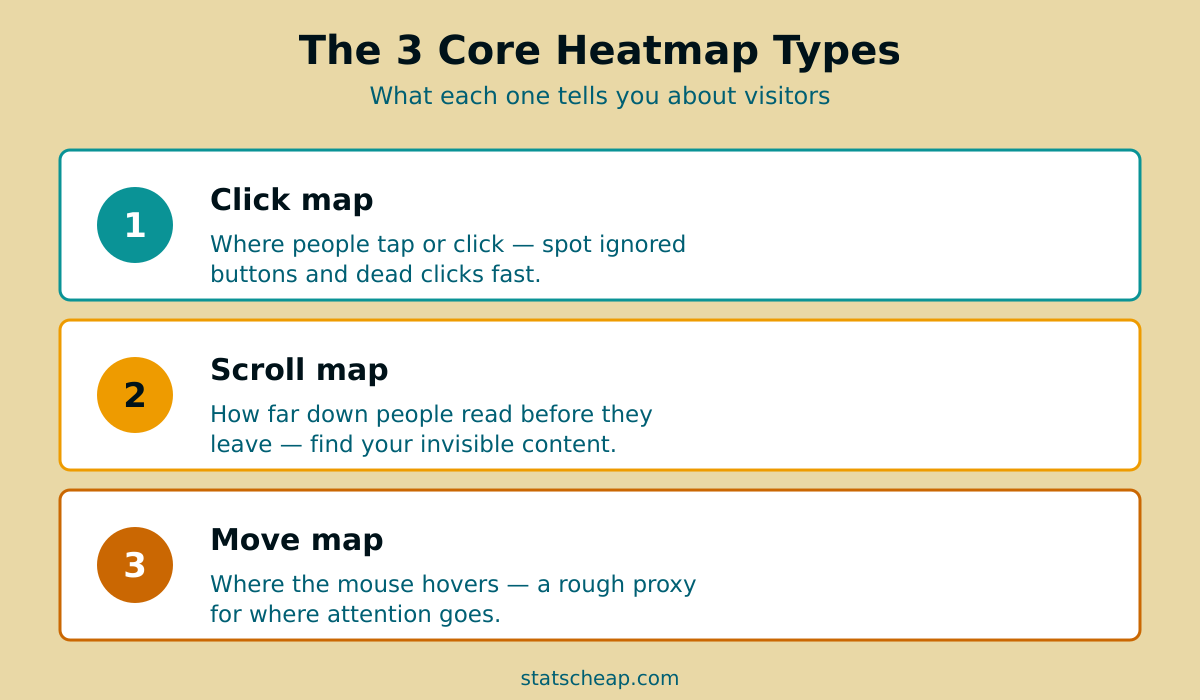
There are three core types you’ll see in every good roundup:
- Click map — Shows exactly where people tap or click. A click map quickly reveals whether visitors are hitting your buttons or clicking dead elements (like an image they expect to zoom). It’s the fastest way to spot a CTA nobody sees.
- Scroll map — Shows how far down the page people actually read before they bounce. If your scroll map goes cold halfway down, your key message below that “fold” is invisible to most visitors.
- Move map (or area/attention map) — Tracks where the mouse hovers, a rough proxy for where eyes go. It’s less precise than clicks, but useful for spotting which sections draw attention and which get skimmed.
Most free heatmap tools bundle these with session recording — actual replays of individual visits, every scroll and click in order. Heatmaps tell you what aggregate behavior looks like; a session recording shows you why one person rage-quit your checkout. Together, they’re the backbone of low-budget conversion rate optimization (CRO): you find the leak with a heatmap, confirm it with a recording, then fix it. For more on this find-and-fix loop, see how heatmaps feed into free A/B testing tools — heatmaps tell you what to test, and that’s half the battle.
1. Microsoft Clarity — Best Free Heatmap Tool Overall
Price: $0/month. Free forever, no paid tier, no card required. If you only set up one tool today, make it this one. Microsoft Clarity is the rare product that’s free forever in the truest sense — there is no upgrade button, because there’s nothing to upgrade to. You get click maps, scroll maps, area heatmaps and unlimited session recordings, with a soft cap of around 100,000 sessions per project per day. For any site that isn’t Amazon, that’s functionally unlimited.
What pushes Clarity past the paid crowd is its frustration detection. It automatically flags rage click events (when someone furiously taps a button that isn’t responding), dead clicks, and excessive scrolling — the exact signals that point you to broken UX. Microsoft funds it as part of its broader ads and cloud ecosystem, which is why it can stay genuinely free at any scale. Budget-friendly doesn’t mean second-rate; here, free is simply the best option.
I won’t re-review every feature here — I’ve already done that in depth. Read the full walkthrough on Microsoft Clarity — the best free heatmap tool, and if you’re weighing it against the obvious paid name, the Clarity vs Hotjar breakdown settles the question. The short version: Clarity wins on price, caps, and frustration signals.
Best for: Everyone. Small businesses, bloggers, e-commerce — if you want the most insight for $0, start here.
2. Hotjar Free — Fastest Setup, Capped Replays
Free tier: 200,000 sessions/mo, 10,000 replays, 1 project. Paid from $49/month. Hotjar is the name most people reach for first, and to be fair, its onboarding is polished — you can be capturing heatmaps within minutes. The free plan covers click, scroll and move maps, session replays, funnels and basic surveys. So far, so good.
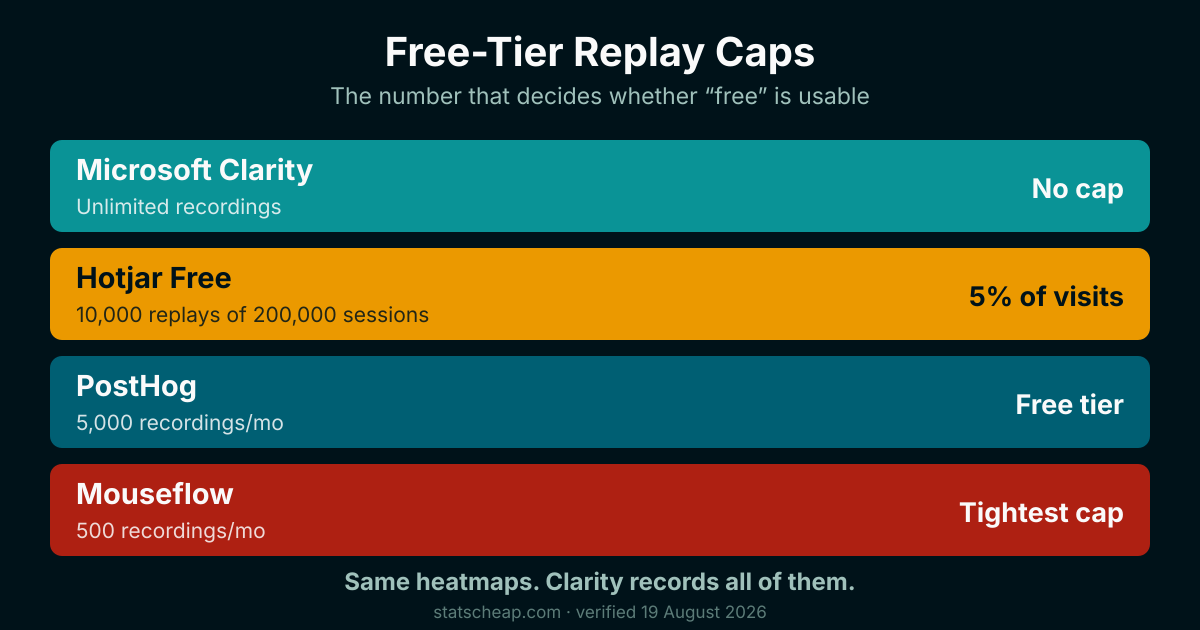
Then you hit the cap that matters. Hotjar counts 200,000 sessions a month but hands back only 10,000 session replays, and Contentsquare’s own footnote says that allowance is fixed and cannot be raised. Heatmaps see the whole audience; the recordings — the part you sit and watch — cover about one visit in twenty on a busy site. Clarity puts no ceiling on either. The single project is the other pinch: split staging from production, or run two client sites, and you are out of room.
Hotjar’s paid ladder now runs on monthly sessions: Growth opens at $49/month for 7,000 sessions, passes $119 at 20,000 and $409 at 100,000, with Pro and Enterprise quoted on request above a million. European customers are billed the same figures in euros. Set that against the free plan and the ladder reads oddly — Growth’s entry rung carries fewer sessions than the free tier’s 200,000. At $49 you are not buying volume, you are buying coverage: Growth matches replays to sessions one-for-one up to 20,000 a month, where the free plan records just 10,000 of its 200,000. The rest of the fee is 13-month data access, three projects, zone-based heatmaps and journey analysis. Surveys are a separate line item again, from $99/month for 500 responses. For raw heatmaps and recordings, none of that beats free. Save your money for what actually matters.
Best for: Teams that want replays and surveys behind one login, on one site, and can live inside 10,000 recordings a month.
3. PostHog — Best Free & Open-Source Pick for Privacy
Free tier: 1M events + 5,000 session replays a month, kept even if you later upgrade. If you care about owning your data, PostHog is the budget-conscious privacy pick. It’s open source under an MIT license, so you can run the whole platform on your own infrastructure and pay nothing beyond hosting — no seat limits, no session caps, your visitor data never leaves your infrastructure. That’s a real edge for anyone worried about GDPR and where session recordings are stored.
On heatmaps, PostHog covers click, scroll, rage-click and movement maps, and it bundles autocapture, product analytics and session replay in one stack. The cloud free tier is genuinely generous: 1 million events and 5,000 session recordings every month before you pay a cent. The catch? PostHog is built for product teams and developers — setup leans technical, and the self-hosted Docker version is recommended only up to roughly 100,000 events/month before you’d migrate to cloud. It’s not the click-and-go experience Clarity or Hotjar offer.
Best for: Privacy-first founders, SaaS builders and anyone comfortable with a bit of setup who wants heatmaps plus full product analytics — without handing visitor data to a third party.
4. Mouseflow Free — Most Heatmap Types Without Paying
Free tier: 500 sessions/month, 1 website, 1 month of history. Paid from $25/month. Mouseflow earns its spot by offering the widest spread of heatmap types on a free plan: click, scroll, movement, attention and even geo maps. If you specifically want an attention or geo view that Clarity doesn’t surface, Mouseflow’s free forever tier is the cheapest way to get it.
The trade-off is volume. You get 500 session recordings a month on one site, with one month of data retention. That’s a fraction of both Hotjar’s replay allowance and Clarity’s ceiling. Heatmaps themselves are not the constraint — the session allowance is, and the free plan keeps only one month of history. Once you outgrow 500 sessions, the Essential plan starts at $25/month and raises the allowance to 5,000 sessions.
Best for: Small sites that want attention or geo heatmaps specifically, and won’t blow past 500 sessions a month.
Two “free” tools to be careful with
A roundup is only honest if it flags the traps. Two names you’ll see elsewhere don’t make my list for good reasons:
- Matomo HeatMaps — Matomo’s core analytics is wonderfully open source and free to self-host, but its heatmap and session-recording feature is a paid plugin sold as a single yearly subscription priced by user count, with a 30-day trial, when you run it yourself. It’s only “included” on Matomo’s Cloud Business+ tier. Calling Matomo a free heatmap tool is the kind of fine print this article exists to expose.
- Smartlook — Frequently listed in older roundups, but Smartlook reached End of Sale on May 31, 2026. Don’t build your CRO workflow on a tool that’s being wound down.
How Much Traffic Before a Heatmap Says Anything?
Free is free, but your time isn’t. So when is a heatmap actually worth the 15 minutes to install? The honest answer depends on traffic — the same way it does for testing. Here’s the rough framework I use, mirroring the thresholds from our guide to free A/B testing tools:
| Monthly Visitors | Is a Heatmap Worth It? | What to Watch |
|---|---|---|
| Under 500 | Optional — install it, but don’t obsess | Scroll depth on your homepage and one key landing page |
| 500–5,000 | Yes — this is the sweet spot | Click maps on CTAs, rage clicks, where scrolls die |
| 5,000–50,000 | Absolutely | Segment by device; mobile vs desktop behavior differs sharply |
| 50,000+ | Essential, and watch the caps | Pick an unlimited free tool (Clarity) so you don’t sample-bias |
Below about 500 visitors a month, a heatmap will show you sparse, noisy data — useful for catching an obviously broken button, but not for nuanced decisions. The real value kicks in once you have enough sessions to see a pattern, roughly 100+ visits to a given page. This is also exactly where free-tier caps start to matter: a tool that records a few hundred sessions a month will quietly miss most of your traffic the moment you cross into the sweet spot. The bigger your traffic, the more an unlimited free tool earns its keep.
Free Heatmap Tools vs Paid: What You Give Up
Let’s be honest about the trade-offs — overselling free tools helps nobody. For pure heatmaps and recordings, the best free options now match or beat the paid tools on the core job. Clarity’s session caps dwarf Hotjar’s, and PostHog hands you a million events a month before asking for anything. So what does paying actually buy you?
- Bundled surveys and feedback widgets — Hotjar’s paid plans add on-site polls and feedback tools. Useful, but you can replicate them with free survey tools.
- Longer data retention — Some free tiers keep recordings for a month; paid plans stretch that to a year. Clarity, notably, retains heatmaps for 13 months for free.
- Dedicated support and SLAs — Paid tools answer faster. Free tools lean on docs and community forums.
- Advanced integrations — Deeper CRM, A/B testing and funnel integrations sometimes sit behind a paywall.
For most small businesses under 50,000 monthly visits, none of that justifies the spend on heatmaps alone. For everyday conversion rate optimization, the free stack covers the 90% that drives decisions. If you’re deciding where your tooling budget belongs more broadly, our guide on whether you really need paid analytics walks through the math — and the answer, for heatmaps specifically, is usually “no.”
Frequently Asked Questions
Is Microsoft Clarity really 100% free?
Yes — genuinely, with no asterisk. Microsoft Clarity has no paid tier, no credit card requirement and no feature gating. You get unlimited heatmaps (click, scroll and area), unlimited session recordings, rage-click and dead-click detection, and AI insights, all at $0/month. There is a soft cap of roughly 100,000 sessions per project per day, which is functionally unlimited for any normal site. Microsoft funds it through its broader advertising and cloud ecosystem, which is why it stays free at any scale rather than nudging you toward an upgrade. It is the clearest case of “free forever” among heatmap tools.
What is the difference between a heatmap and a session recording?
A heatmap is an aggregate, color-coded snapshot of how many visitors clicked, scrolled or hovered across a page — it answers “what do people do here on average?” A session recording is a replay of one individual visit, showing every scroll, click and pause in order — it answers “why did this person behave that way?” Heatmaps are great for spotting patterns fast (a cold scroll map, an ignored button); recordings are great for diagnosing the cause once a heatmap flags a problem. Most free tools, including Clarity, give you both, and the two work best together: find the leak with a heatmap, confirm it with a recording.
Is there a free alternative to Hotjar?
Yes. Microsoft Clarity is the standout: it offers unlimited heatmaps and session recordings for free, while Hotjar’s free plan — generous at 200,000 monthly sessions — hands back only 10,000 of them as replays you can watch. For a privacy-first, open-source alternative, PostHog is MIT-licensed and can run on your own infrastructure, though its own guidance points larger volumes back to the cloud tier. Mouseflow’s free plan offers the widest range of heatmap types (including attention and geo maps) at 500 sessions a month. For most users replacing Hotjar to save money, Clarity is the direct, no-compromise swap — same insight, no replay ceiling, $0/month.
Are free heatmap tools GDPR-compliant?
They can be, but it depends on configuration, not the price tag. Session recordings capture visitor behavior, so under GDPR you typically need a cookie consent banner and a privacy policy that discloses the tracking. Cloud tools like Clarity and Hotjar process data on their servers, so review their data-processing terms and mask sensitive fields (Clarity and most tools auto-mask form inputs by default). If data ownership is your priority, a self-hosted open-source option like PostHog keeps all recording data on your own infrastructure, which makes GDPR compliance simpler because nothing leaves your control. Either way, get consent before you record.
How much traffic do you need before heatmaps are useful?
You need enough sessions to see a pattern rather than noise — roughly 100+ visits to a specific page before a heatmap tells you anything reliable. Below about 500 monthly visitors site-wide, a heatmap is still worth installing (it’s free) but treat it as directional. The sweet spot is 500 to 50,000 monthly visitors, where you have enough data to act but small enough scale that fixing one leaky page moves the needle. Critically, this is also where free-tier caps start to hurt: a tool that caps recordings in the low thousands per month will miss most of your traffic, so once you cross into the useful range, choose an unlimited free tool like Clarity.
Which One to Install First
Here’s the budget-smart verdict after testing all of them. For 90% of small businesses, bloggers and bootstrapped sites, the decision is genuinely simple — and it costs nothing.
- Pick Microsoft Clarity if you want the best free heatmap tool, full stop. Unlimited, free forever, with rage-click detection. Start here.
- Pick PostHog if data ownership and GDPR matter, or you want product analytics in the same open-source stack. Self-host if data residency matters more than operational simplicity.
- Pick Mouseflow if you specifically need attention or geo heatmaps and stay under 500 sessions a month.
- Pick Hotjar Free if you want replays and surveys under one login and 10,000 replays a month covers you — its free tier is far stronger than it was a year ago.
- Skip Matomo HeatMaps and Smartlook — the first is a paid plugin dressed as free, the second is being retired by Cisco — you can no longer buy or renew it, and the servers go dark on 31 August 2027.
The takeaway is the one I keep coming back to on this site: you don’t need to spend a dime to understand how visitors use your website. Hotjar’s $49/month buys features rather than volume, and a tool that’s free forever still records more of your visitors. Invest your testing budget where it counts — on the changes a heatmap reveals, not on the heatmap itself. Once you’ve spotted what’s broken, the next step is fixing it: heatmaps pair perfectly with free A/B testing tools, and they slot neatly into a wider free web analytics setup. Want the whole picture? Here’s how to build a full analytics stack for $0 — heatmaps included.